The Query That Made Me Appreciate AI SQL Tools
As part of the database management course in the third year of my studies, there was a need to write a query that would select the five highest-revenue products for each category, but only for the customers that bought more than three items in the last 90 days, excluding returns. There should be alphabetical sorting of ties based on the product name.
I spent an hour looking at this problem. This is not due to the fact that I did not fully understand the task itself, since I clearly knew what to do. However, there was an inability to express it through nested queries and window functions in a correct order and syntax.
I asked Claude to solve my problem and provide detailed explanations of its structure and logic. He provided me with a solution using a Common Table Expression, RANK() window function, and explanations of why certain things were written this way.
The real power of artificial intelligence SQL generation lies not in sidestepping knowledge of SQL, but in closing the distance between what you can imagine and what you can express, particularly when the idea is sound but the syntax is working against you.
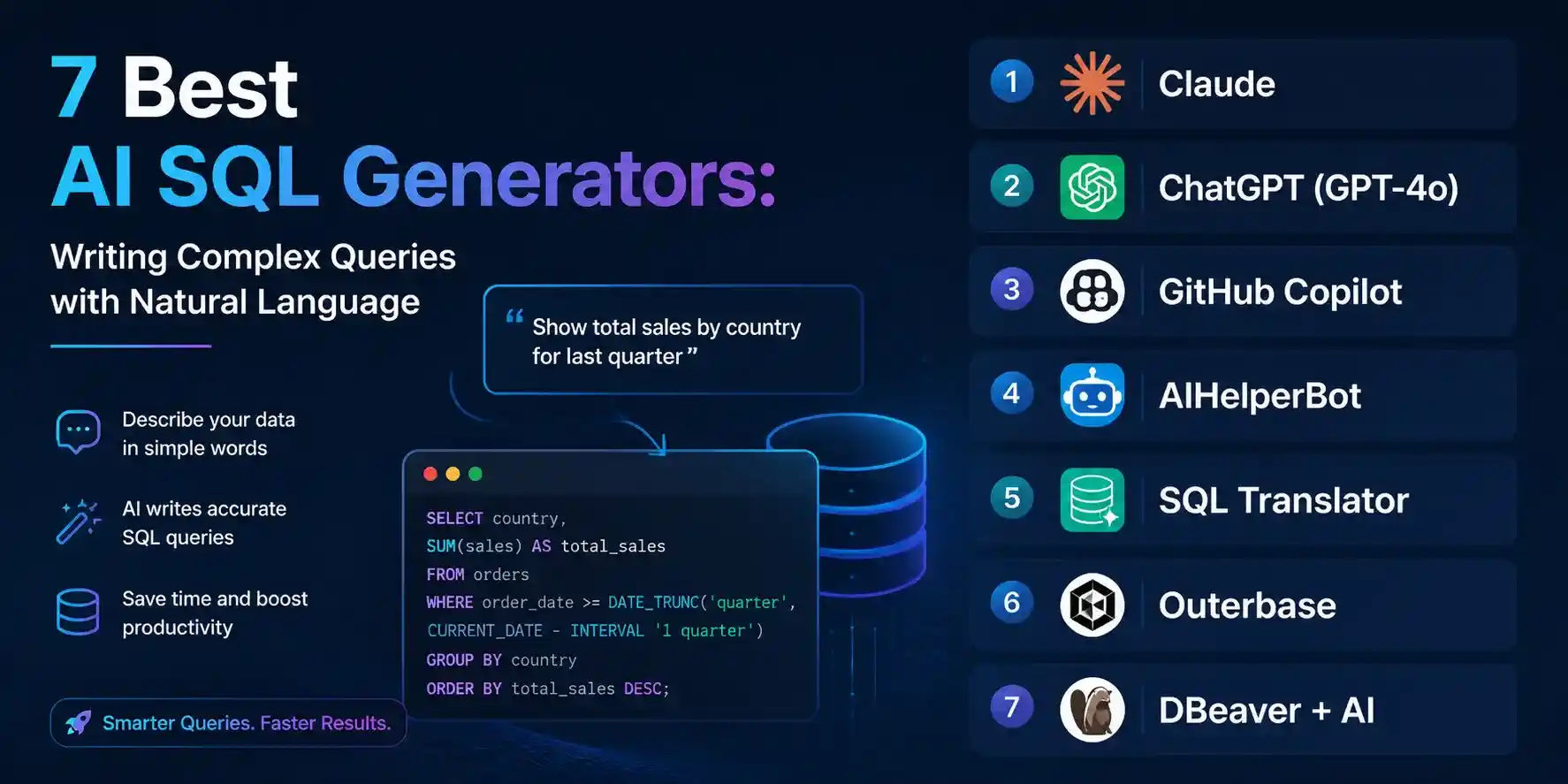
In this article, we examine the seven most effective programs for accomplishing this task, using actual examples ranging from basic SELECT statements to complex analytic queries with windowing functions.
| Tool | Best For | SQL Dialects | Price | Rating |
|---|---|---|---|---|
| Claude | Complex queries + step-by-step explanation | All major dialects | Free / $20 Pro | ⭐ 4.9/5 |
| TOP PICKChatGPT (GPT-4o) | Iterative debugging and refinement | All major dialects | Free / $20 mo | ⭐ 4.7/5 |
| GitHub Copilot | Inline SQL inside your editor or IDE | All major dialects | Free (Student Pack) | ⭐ 4.6/5 |
| AIHelperBot | Dedicated SQL UI with schema input | PostgreSQL, MySQL, SQLite, more | Free / $9 mo | ⭐ 4.5/5 |
| SQL Translator | Quick plain-English to SQL conversion | PostgreSQL, MySQL, SQLite | Free | ⭐ 4.3/5 |
| Outerbase | Full AI-powered database workspace | PostgreSQL, MySQL, BigQuery, more | Free / $20 mo | ⭐ 4.4/5 |
| DBeaver + AI | AI SQL inside a full DB client | All dialects via JDBC | Free (Community) | ⭐ 4.2/5 |
Before You Start: The One Thing That Changes Everything
All AI SQL generators rise or fall on how well they understand the schema context provided to them. That’s the primary differentiator between an output that works and a generated jumble of non-existent tables.
First, do this before asking any prompt:
-- Paste your schema like this
CREATE TABLE customers (
  id SERIAL PRIMARY KEY,
  name VARCHAR(100),
  email VARCHAR(100),
  created_at TIMESTAMP
);

CREATE TABLE orders (
  id SERIAL PRIMARY KEY,
  customer_id INT REFERENCES customers(id),
  total_amount DECIMAL(10,2),
  status VARCHAR(20), -- 'completed', 'refunded', 'pending'
  created_at TIMESTAMP
);

CREATE TABLE order_items (
  id SERIAL PRIMARY KEY,
  order_id INT REFERENCES orders(id),
  product_id INT REFERENCES products(id),
  quantity INT,
  unit_price DECIMAL(10,2)
);
Insert this schema template at the beginning of every chat session. Otherwise, the AI will make up column names that may or may not be correct according to your database, guess the data types, and make assumptions about relationships which may be incorrect.
This holds true for every single item on this list, from specialized SQL editors to general language models to in-editor AI assistants.
1. Claude — The Best SQL Explainer and Generator
Claude is my weapon of choice when undertaking an SQL assignment whose complexity exceeds simple queries involving a SELECT statement and a WHERE clause. What is unique about using Claude to generate a SQL query is that, not only will the generated query be functional, but also understandable.
Why it's essential for SQL: And when I feed the schema and then provide Claude with an explanation for a complex analysis query, he does not just generate the SQL. He provides me with insight into how the SQL was written: Why did he use a CTE instead of a subquery? What is the purpose of the window function partitioning? Why is the order of the joins important in this scenario?
Best Feature: Query-building process. If you have a particularly complicated query to generate, you may also instruct Claude to create it progressively, e.g., "create first the CTE filtering out active clients, then include the JOIN on orders, and then apply the window function." This way, you will be able to check all parts before assembling them, which will match what an experienced SQL programmer would do.
Limitations: Claude does not integrate with your live database. Claude cannot execute the query and give you the result, and it cannot infer the schema on its own — you need to provide it. Regarding dialect-specific edge cases such as Snowflake’s QUALIFY clause and BigQuery’s ARRAY_AGG function syntax, refer to your database documentation.
Pros
- Everything is explained, even the smallest details — you know what the request does, not just what it is
- Can handle CTEs, window functions, recursive queries, and multi-table JOINs correctly
- Incremental building allows for the transformation of complicated queries into verifiable steps
- The free version is enough for the majority of SQL writing tasks developers face
Cons
- Database connection is offline — queries and results verification are not possible
- Manual insertion of schema in each conversation due to lack of persistent memory
- Syntax is highly specialized (Snowflake QUALIFY, BigQuery UNNEST) and requires validation
- Copying and pasting process is inconvenient compared to editor-based solutions like Copilot
The Schema + Intent Prompt That Actually Works
Developers usually ask an AI SQL generator this way: "Please write me a SQL query to get top customers." The results will be generic and inaccurate because the AI doesn’t know anything about your tables, what you mean by “top,” or even what database system you’re using.
This is how you should ask your AI to generate SQL:
Database: PostgreSQL

Schema:
[paste CREATE TABLE statements]

Task: Find the top 5 customers by total order value in the last 6 months,
excluding orders with status = 'refunded'. Show customer name, email,
total order value, and number of orders. Sort by total order value descending.

Output format I want:
| customer_name | email | total_value | order_count |
Three components — dialect, schema, task with explicit output columns — eliminate 90% of the correction cycles developers waste on vague prompts.
2. ChatGPT (GPT-4o) — The Multi-Turn SQL Debugger
The advantage of ChatGPT when it comes to doing SQL is not in its first iteration, which is actually slightly less accurate than Claude. The advantage of ChatGPT lies in what comes after the first iteration, that is the process of repeatedly debugging by pasting in the error message and describing the output.
Why it's essential for SQL: The Production SQL that you come up with doesn’t always work the first time around. You come up with a query, execute it, see some sort of error or the result is wrong, then you have to try again. With ChatGPT, however, you can be assured that all the conversations before will be remembered by it. This means that there is no need to repeat yourself again and again.
Best Feature: Error-based debugging. Enter a PostgreSQL error message or an invalid result set that shows “the query gives duplicate rows if there are several orders placed by the same customer on the same date.” The model will find the missing keyword DISTINCT or GROUP BY incorrectly used, among other details of the SQL statement.
Limitations: The free plan (rate-limited GPT-4o) can disrupt a lengthy debugging process of a complicated query. In case you use ChatGPT to solve some problems with SQL, which requires numerous rounds of improvements (around twelve or fifteen rounds), the Plus version begins to be essential. Moreover, beware of overly confident results: sometimes ChatGPT provides syntactically correct, yet logically incorrect SQL code, especially in terms of aggregates and GROUP BY.
Pros
- Retains multi-turn context for natural and rapid debugging iteration
- Exceptional at detecting erroneous outcomes – not only syntax issues but logical flaws
- Capable of converting functioning SQL from one dialect to another – e.g., PostgreSQL to BigQuery, MySQL to SQLite
- Produces test data and output tables to ensure query logic before execution
Cons
- Free-tier rate limits interfere with prolonged debugging processes for intricate queries
- Sometimes too confident about aggregate operations — remember to always validate GROUP BY results
- Unable to connect to the database — the result can’t be verified against actual data
- $20/month paid plan is rather expensive for students requiring occasional SQL assistance
3. GitHub Copilot — SQL in the Editor, Zero Context Switching
The SQL feature in Copilot is highly useful when SQL exists within application code, whether that’s composing a SQL query directly in a Python script, an untyped query in a TypeScript ORM, a Django model raw method, or even a .sql migration file. You don’t have to open up your web browser, as Copilot gives you the suggestions inline!
Why it's essential for SQL: It is difficult switching contexts. You are busy developing a FastAPI API, require a SQL query that will give you certain data, have to switch over to Claude or ChatGPT, explain your schema to the model, copy the generated query back, format it into a string of Python – all that takes from two to three minutes and disrupts the programming process. Copilot does it in-place, directly within the string literal.
Best Feature: Comments to SQL Query generation. Add comments before the query string such as # fetch month-wise revenue generated by products by categories in the last 12 months, but not the cancelled orders and Copilot provides the complete SQL query right there in-line. It’s really reliable for regular analysis type queries.
Limitations: It does not have any information about your real-life schema unless you have opened the files where you define the schema. The names used by Copilot for columns when creating queries against non-contextual schema can be random and may not correspond to your real schema at all — always verify the generated code. It also has no explanation capabilities like Claude; it generates queries without explaining why.
Pros
- Inline SQL generation within your editor — SQL is generated right where it belongs
- Comment-based SQL generation is perfect for regular SQL statements and typical data analyses
- For students, it's free using the GitHub Student Developer Pack — no charge at all
- SQL generation across all languages — Python string interpolation, JS template literals, .sql files, ORMs
Cons
- No schema awareness if schema files are not opened in the editor session
- Lack of explanation for generated queries — only get the SQL without knowing why
- Trouble with complex queries that need CTEs or window functions without schema knowledge
- Internet connection required — can't work offline for limited access situations
4. AIHelperBot — The Dedicated SQL Generation UI
This design makes AIHelperBot an excellent tool for generating SQL code, offering it a critical UX feature above other LLMs because there is a defined user flow, in which you put your schema into the input form, choose the appropriate database dialect, provide the description for the SQL query, and receive your result – without having to come up with a good prompt. The input form for schemas solves the problem of context provision that developers usually ignore when using either Claude or ChatGPT.
Why it's essential for SQL: For developers who aren't experts in using large language models (LLMs), such as data scientists, entry-level developers, or individuals who use SQL queries sporadically rather than regularly, the structured input provided by AIHelperBot relieves them of the responsibility of writing prompts. Users need only to fill out fields, not generate prompts from scratch. This allows users to obtain Claude-level results without knowing how to create a Claude-level prompt.
Best Feature: Schema-first interface. This is because the system uses a dedicated area to enter the schema before you actually craft your natural language statement. The fact that you need to provide such information first is the main reason why the output generated by AIHelperBot needs fewer fixes than the query described to a generic LLM.
Limitations: The interface on AIHelperBot, which is friendly for beginners, is more restrictive compared to a free-form interaction with an LLM in dealing with complex queries involving multiple steps. One cannot ask for subsequent questions or for the construction of something incrementally. If the query is relatively simple to moderately complex, then the interface works very well.
Pros
- Structured schema input form eliminates the requirement of prompt engineering knowledge
- Dialect selector ensures accurate output that matches your unique database
- Simple UI design—no distractions from an all-purpose chatbot design
- The free plan accommodates all common queries without limitations
Cons
- Not as adaptable as a conversational LLM for incremental improvement and additional queries
- Focused on SQL code generation only — no debugging, explaining, or multiple turns
- No daily query limit in the free version that resets each day
- Less sophisticated functionalities than a complete database workspace such as Outerbase
5. SQL Translator — Instant Plain-English to SQL
SQL Translator (sqltranslator.io) is the easiest to use of all these tools. For one-time SQL generation needs, that’s an advantage. Copy-paste your English statement into the app, pick your database, and hit translate. No sign-up process, no schema entry screen, no need for configuration.
Why it's essential for SQL: Not all SQL operations necessitate reasoning exercises. At times, what you will be doing is something simple like writing a SELECT statement with a WHERE clause you do not recall how to write; creating an operation that needs verification on the JOIN clause, or prototyping a query to be sure that you are getting your facts right about your real query. None of the tools in this list can compete with SQL Translator regarding this.
Best Feature: Zero-setup speed. You don’t have to sign up for an account, craft your prompt, or enter your schema information. If you’re a developer looking for a fast response to a simple SQL problem like “How do I perform a self join?” or “What is the CROSS APPLY syntax in SQL Server?,” SQL Translator is the best option.
Limitations: SQL Translator, without any schema context, produces standard queries that contain dummy table and column names. In all real-world production scenarios, one would have to replace them with actual values. It would be prudent to use this application primarily for its prototyping capabilities and reference purposes.
Pros
- Zero setup – zero accounts, no input of schemas, no prompt engineering
- The fastest software to use for single-shot queries and syntax checks
- Reverse translation is possible – copy SQL and get an English description
- Completely free with no limitations in usage of standard queries
Cons
- No schema knowledge – relies on placeholder names that need to be substituted before using
- Does not support complicated multi-table query analysis involving business logic
- Lacks ability for iterative improvements or follow-up discussion
- Poor accuracy with analytical queries involving windowing functions or common table expressions (CTEs)
6. Outerbase — The Full AI Database Workspace
Outerbase belongs to a separate class compared to the other tools listed above. Not only does Outerbase generate SQL code; it is a complete database environment wherein you can hook up your database, ask questions about your data using natural language, and execute queries based on real results. In effect, it serves as the fusion of a database client, an artificial intelligence-based query builder, and a data explorer.
Why it's essential for SQL: The rest of the tools here will give you SQL code to execute that needs to be copied and pasted into your database client and run manually. But Outerbase takes the process one step further. Ask "What were the product categories that saw revenue decline on a quarterly basis in 2025?", and Outerbase does the work for you, creating the SQL, executing it against your connected database, and presenting you with the results – including a chart if the information can be represented visually.
Best Feature: AI query generation with live database connection. It is not a system which creates fake databases; it connects to your real PostgreSQL, MySQL, or BigQuery database. It performs AI query generation with all the details on the actual schema (it knows about the schema because it can read it), and it gives you actual results. There is no need to provide any schema in advance.
Limitations: Establishing a connection between your production database and any third-party software presupposes some level of trust regarding its security architecture. Given the sensitive nature of production databases, Outerbase should be evaluated thoroughly for its data and privacy policies prior to implementation. Also, the free package’s limitations with respect to connections and queries render it suitable only for learning and development purposes.
Pros
- Live database connection – AI formulates and runs queries on your live data
- Auto-scans your true database structure – no need to define your schema manually
- Automatically presents the results of queries as graphs for analysis
- Interactive platform allows sharing of queries and results with team members
Cons
- Linking the production database to any external tool involves security review
- The free tier connection limit hinders high usage
- Too much trouble for rapid generation of SQL queries – it is not worth the time
- $20 per month for the paid version can be costly if you do not use it frequently
7. DBeaver + AI — SQL AI Inside a Full Database Client
The community edition of DBeaver is one of the most popular database clients for developers and data engineers. The AI SQL Assistant feature provides natural language query creation directly within that environment – there is no need to switch to a web browser window to do that.
Why it's essential for SQL: As a developer who already uses DBeaver, the use of the AI in their software becomes very relevant right away. You are already viewing your schema on the left panel, you are already connected to the database, and you are already in the query editor. This feature creates the SQL code within this editor, and it has the ability to use your connected schema for context on column and table names.
Best Feature: SQL generation that is aware of your schema. Since DBeaver uses your live schema, the AI assistant generates SQL based on your actual table and column names rather than placeholder names. This avoids the most common revision step in AI SQL generation: renaming invented names to real names.
Limitations: The AI functionality of DBeaver relies on a third-party LLM API (such as OpenAI or other similar ones), which implies that users have to provide their API keys and cover the costs themselves. This entails additional hassle and expense, which is why not all users prefer it over other SQL tools with native AI capabilities.
Pros
- AI SQL within a comprehensive database client — no need to switch context from your schema viewer
- Schema aware based on your live connection — recognizes actual table and column names automatically
- Free of charge and open source — the DBeaver Community Edition does not require any license
- Connects to all popular databases through JDBC: PostgreSQL, MySQL, Oracle, SQL Server, etc.
Cons
- Requires provision of your own OpenAI API key — more configuration and variable expense
- AI capabilities somewhat rudimentary compared to specialized SQL generator software
- Resource-intensive desktop application — not ideal for rapid SQL code creation in a browser environment
- AI capabilities contingent on the quality of the external model you use, not an internal optimized model
Practical Workflows: Real SQL Tasks, AI-Assisted
Writing an Analytical Query with Window Functions
The task: Rank sales reps by monthly revenue within each region, show their rank and the percentage of total regional revenue they account for.
The prompt to Claude:
Database: PostgreSQL

Schema:
CREATE TABLE sales_reps (id SERIAL PRIMARY KEY, name VARCHAR, region VARCHAR);
CREATE TABLE sales (id SERIAL PRIMARY KEY, rep_id INT, amount DECIMAL, sale_date DATE);

Task: For each month in 2025, rank sales reps by total revenue within their region.
Show: month, region, rep name, total revenue, rank within region, and their percentage
of total regional revenue for that month. Use window functions.
Claude creates a SQL query that uses RANK() OVER (PARTITION BY region, month ORDER BY revenue DESC) and SUM() OVER (PARTITION BY region, month) in order to calculate the percentage value. The query has a CTE to aggregate the total revenue per month. This is what makes the PARTITION clause necessary, which many newbies in window functions cannot figure out.
Debugging a Wrong Aggregate Result
The task: Your query returns customer revenue that is inflated when customers have multiple orders with multiple items — a classic fan-out JOIN multiplication bug.
The prompt to ChatGPT:
"My query is returning inflated revenue totals for customers. I think it's because joining orders to order_items is multiplying rows. Here is the query: [paste query]. The schema is: [paste schema]. How do I fix the double-counting?"
ChatGPT recognizes the fan-out, clarifies that performing an aggregation following a multi-table JOIN increases the number of rows before summing them up, and restructures the query to first perform an aggregation on order_items using a sub-query or Common Table Expression.
Migrating a Query Between Dialects
The task: You have a working MySQL query that uses GROUP_CONCAT and need to convert it to PostgreSQL, which uses STRING_AGG with a different syntax.
The prompt to ChatGPT:
"Convert this MySQL query to PostgreSQL. Pay attention to any MySQL-specific functions and replace them with PostgreSQL equivalents. Here is the query: [paste query]."
The ChatGPT finds all dialect-specific functions such as GROUP_CONCAT, IFNULL, LIMIT x, y syntax and translates them into their PostgreSQL counterparts along with a comment that specifies the syntax change. It took a migration, which once required reviewing two documentation pages, thirty seconds to complete.
Generating a Query From a Business Question
The task: Your product manager asks: "Can you pull a list of customers who signed up more than 6 months ago, have placed at least 3 orders, but haven't ordered anything in the last 60 days? We want to target them for a win-back campaign."
The prompt to Claude:
"Database: PostgreSQL. Schema: [paste schema]. Business requirement: Find customers who: (1) registered more than 6 months ago, (2) have placed at least 3 completed orders total, (3) have NOT placed any order in the last 60 days. Return customer id, name, email, total order count, and date of their last order."
That's precisely the kind of task that an AI is well suited for — translating an imprecisely stated business requirement to SQL, using HAVING, NOT EXISTS, and date calculations.
What to Avoid: Common Mistakes With AI SQL Generators
The most serious blunder is executing AI-generated SQL statements against a live database without examining them. A faulty statement like DELETE or UPDATE without a WHERE clause, resulting from an AI's misinterpretation of your intended request, will delete or modify data that could be irreversibly lost. Always execute unfamiliar queries in a test environment or within a transaction block (BEGIN; ... ROLLBACK;) prior to commit.
A more subtle blunder is executing a perfectly formed SQL statement but logically flawed one. AI SQL generators excel at generating valid SQL code – but when a valid statement returns incorrect results, it's not nearly as easy to detect as a syntax error causing a compile failure. Always validate your output on a sample set of data before going into production.
Lastly, don't expect an AI to generate a logical SQL statement when no schema information is provided in your request. The number one habit you should develop when using any AI SQL generator is providing schema details upfront.
The SQL Developer's Recommended Stack
Most developers will find their best configuration to be Claude for complex analysis queries and explanations, ChatGPT for debugging queries through iterations, and GitHub Copilot for SQL generation within application code (for free using Student Pack). For developers looking for an easy-to-use solution that requires no setup, SQL Translator should be added as a browser bookmark. This quartet of tools is free for students and supports all types of SQL generation tasks from basic SELECT statements to complicated analytical queries with multiple CTEs.
The Queries AI Handles Best vs. Worst
AI handles extremely well: Aggregation on single tables, joining two to three tables, grouping and filtering using HAVING, window functions including RANK, ROW_NUMBER, LAG, and LEAD, Common Table Expressions (CTEs), date operations, CASE WHEN statements, subqueries, and database dialect conversion.
AI handles adequately with verification: Four or more table JOINs, recursive Common Table Expressions (CTEs) for hierarchical data, very specific SQL dialect capabilities (e.g., Snowflake QUALIFY, BigQuery ARRAY_AGG with STRUCT), and performance tuning advice for big data scenarios.
AI handles poorly — verify carefully: These include queries involving implicit business rules that the AI is unable to deduce from the database schema alone, complicated permission logic or row-level security logic, triggers or stored procedures with side effects, and any query for which data distribution plays a role in determining its correctness.
Knowledge of the situations in which AI SQL engines are trustworthy, as opposed to those in which they require additional scrutiny, allows you to determine the level of confidence to place in the results.
Final Thoughts
SQL is one of the most valuable and syntax-heavy abilities a programmer can master. Exactly this disconnect between having the problem understood but being unable to translate it into code is what AI will be able to solve most efficiently.
First of all, familiarize yourself with Claude and a good schema to practice prompts on. Get used to schema+intent prompts. Add GitHub Copilot if you are a student and wish to avoid switching contexts while writing SQL queries. Go for ChatGPT to debug queries that do not behave as expected in a multistep process.
Your aim is not to replace your knowledge of SQL but to learn how to use an AI tool to generate queries you will then modify, understand, and debug. The best SQL developers working with AI are those who understand why the query was written this way, what its shortcomings are, and how they can modify it to their needs. You may even find the explanation useful enough to skip the payment.