Why Literature Review Is Broken — and How AI Is Fixing It
For example, last year, I received a task from my advisor for a literature review survey of transformers in NLP for biomedical data analysis. The assignment included a list of twelve papers provided to me by my advisor and the statement, "find the rest." After six weeks, I was left with seventy-three papers in a folder, a disorganized Zotero library, and a rough draft that lacked any real synthesis.
This changed dramatically when a PhD student from my lab demonstrated to me how he performs reviews. Rather than going through papers individually, he asks questions from multiple papers at once and uses AI to identify contradicting findings and automatically generate a comparative table of approaches. Previously, it took him three weeks to do this; now, it only takes five days.
This is the truth for researchers in 2026: the amount of information available makes a traditional, linear approach to literature review impossible. With more than 2.5 million articles being published every year, reading all the literature pertinent to your area of research isn’t possible; it’s delusional. AI won’t make decisions for you, but it will streamline the process to give you room to think.
What comes next isn’t a compilation of tools based on their press releases or marketing strategies. The following are tools I've tried using myself while working on surveys and other research projects.
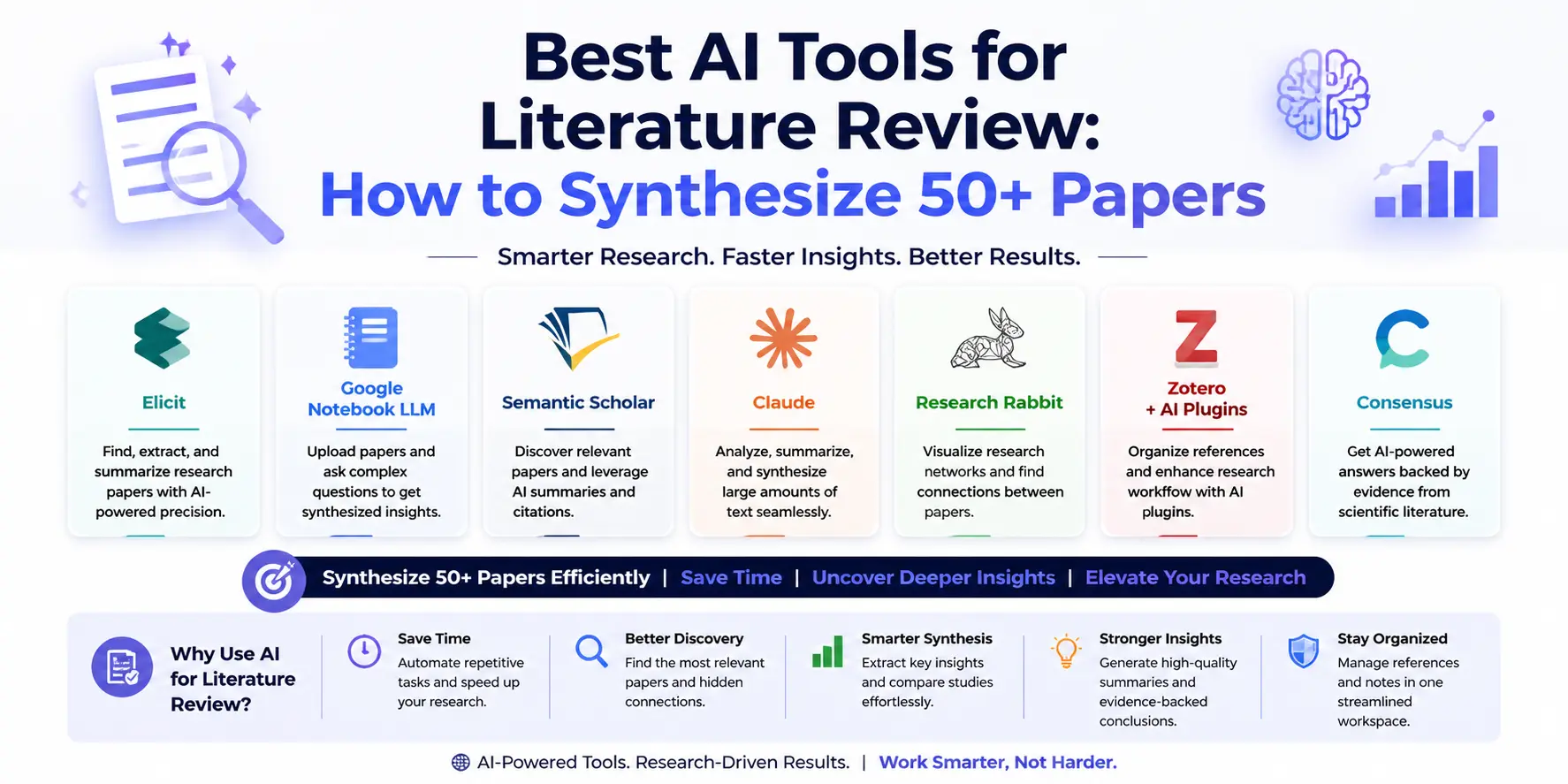
| Tool | Best For | Price | Rating |
|---|---|---|---|
| Elicit | Research question-driven discovery | Free / $12 mo | ⭐ 4.8/5 |
| TOP PICKGoogle NotebookLM | Multi-paper synthesis & Q&A | Free | ⭐ 4.7/5 |
| Semantic Scholar | Citation graphs & paper discovery | Free | ⭐ 4.6/5 |
| Claude (claude.ai) | Long-form summarization & writing | Free / $20 Pro | ⭐ 4.7/5 |
| Research Rabbit | Visual citation network mapping | Free | ⭐ 4.4/5 |
| Zotero + AI plugins | Reference management + summaries | Free | ⭐ 4.3/5 |
| Consensus | Evidence-based claim verification | Free / $9 mo | ⭐ 4.2/5 |
Elicit — The Research Question Engine
When talking about tools that have significantly impacted my perspective towards a literature review, the one thing that comes first to mind is Elicit. Unlike other tools that require typing of keywords to a search bar, Elicit offers the user the chance to ask his question, just as he would when speaking to another person.
Why it's essential for literature review: The current paradigm of querying Google Scholar, Semantic Scholar, and PubMed with keywords is inherently fragile. I will be given articles that match my query; however, Elicit knows what question I am trying to ask. For example, when I queried "What are the failure modes of retrieval-augmented generation systems in low-resource languages?", I received results that could never be produced by a keyword query, since it was thinking about the concepts in the question.
This is where the real power of the Elicit tool shines. With each research paper that pops up as part of your findings, you have the option of defining specific columns for the type of data you would like to extract, such as population being studied, methods used, data set size, metric used to evaluate, etc., and Elicit does that automatically using the paper.
Best Feature: Column extraction automated in multiple papers. That alone is time saved that used to be wasted on manual note-taking. Set up your extraction rules once, execute against 50 papers, and you've got your data set up for analysis.
Limitations: Although Elicit’s database is substantial, it focuses more on STEM disciplines and social sciences. Results related to humanities or interdisciplinary subjects might not be as substantial. Moreover, accuracy declines for old articles with odd formatting, preprints, and articles with high paywalls.
Pros
- Natural language research question input – no need for keywords
- Customizable column generation extracts relevant information from papers automatically
- Highlights assertions, approaches, and results of each paper with citations
- Exports to CSV format – works with Excel, Notion, and Zotero
Cons
- Databases have less coverage in humanities and non-English literature areas
- Accuracy decreases when working with messy PDF and preprint formats
- Free version has limitations regarding number of papers to extract data from
- Doesn't create the narrative synthesis itself, that task is up to you
Setting Up Elicit for a Literature Review
- 1
Head over to elicite.com and make an account — it’s free. No institutional emails needed but, if you’re willing to pay, the premium plan gives you greater extraction capabilities.
- 2
In the primary search bar, enter your research question — as a full sentence, not keywords. For example, 'How well do large language models do on math benchmarking tests relative to symbolic systems?'
- 3
The best papers are displayed with Elicit ranking them by relevancy. Look through their abstracts in the right-hand side. Apply filters (date range, type of study, number of citations) to get a more focused set of results.
- 4
Click on 'Add Columns' and tell Elicit which information you would like to extract from each paper — e.g., sample size, evaluation data set, model type, performance metric, limitation. Elicit will populate all of that information for you automatically for every single paper in your results!
- 5
Now that you have your matrix of data fully populated, download your table in CSV format — now it is ready to be pasted into Notion, opened up in Excel, imported to a reference manager.
Google NotebookLM — The Multi-Paper Q&A System
The NotebokLM came into play as a note-taking application, and today it has grown into being one of the most advanced platforms for synthesizing information, and everything is provided at no cost. It all revolves around an extremely straightforward feature: provide the sources that you have (PDFs, Google Docs, links or texts), and ask some questions which NotebokLM will answer based on the sources.
Why it's essential for literature review: This feature distinguishes NotebookLM from other similar applications. After uploading fifteen papers on the topic of knowledge graph construction, I made a request for the system to find contradictions within these texts in terms of their attitude to the entity disambiguation problem. Notably, the software identified two papers, which expressed directly conflicting views regarding the issue at hand. The whole process would traditionally take hours of intensive work.
Best Feature: Answer backed by citation. Each point stated by NotebookLM is referenced to the exact part where it comes from. When writing a review of literature, you need to be sure of what you're working with. This makes NotebookLM one of the very few AI solutions that are truly safe for research purposes; you can double-check everything before using it in your paper.
Limitations: The scope of NotebookLM is determined by the information you import into it. It will not browse the internet or bring in any paper that is not imported into it; this is its weakness as well as its strength because there will be no hallucinations based on open data, but you will have to find the papers in the first place using Elicit or Semantic Scholar.
Pros
- The output is based on the actual text of the source — completely verifiable outputs
- Detects inconsistencies and common ground among texts
- Entirely free with Google account — no limitations to use
- Creates study guides, briefing notes, and mind maps from your sources
Cons
- Closed corpus only – doesn’t pull in papers that you don’t upload
- Limited capacity to upload papers per notebook can become an issue when reviewing 50+ papers
- Citation data cannot be exported into reference manager software like Zotero
- Audio summary functionality is excellent but irrelevant to research paper synthesis processes
Semantic Scholar — The Citation Intelligence Layer
Semantic Scholar, developed by the Allen Institute for AI, is essentially the scholarly equivalent of Google Scholar, except built with researchers in mind instead of being optimized for search engines. The database contains more than 220 million scholarly articles, and on top of normal search functionality, Semantic Scholar incorporates semantic analysis to highlight relationships within documents.
Why it's essential for literature review: Most often underutilized feature in any literature review platform would be the citation graph. Filter for "Highly Influential Citations" on Semantic Scholar provides you with the list of papers among your search results that have been cited not only extensively but also significantly — that is, by researchers who have used them as foundation for their work or have refuted or extended their findings.
TLDR provides a two-sentence summary for each article right in the search results. It saves you enough time to filter through 100 papers in the same time that you would otherwise spend on 10 papers reading their abstracts carefully. After filtering 20 articles, you can then open them up in Elicit/NotebookLM.
Best Feature: The "Semantic Reader" browser-based PDF reader. While reading an article, when you hover on the citation, the TLDR (Too Long Didn't Read) summary of the cited article pops up automatically – no need for opening multiple tabs. Following citation trails, which previously entailed jumping around numerous tabs, now becomes a straightforward process.
Limitations: The coverage by Semantic Scholar is very good for Computer Science, Biology, and Medicine, but somewhat uneven when it comes to Economics, Law, and Humanities. The generated AI summary serves as a triaging device; one cannot rely on the summaries without having at least read the abstracts themselves.
Pros
- Summary of each article saves the hassle of dealing with over a hundred results
- Influential citations filter saves time to find important articles rather than using citation metrics only
- Semantic Reader saves trouble of citation chase within one window
- Totally free without registration
Cons
- Incomplete coverage for humanities, law, and social science literature
- Too short TLDRs for complicated papers - you should read the abstract yourself
- Extracts nothing, no structured information, is only an intermediary process to another tool
- Paper alerts based on a topic need user registration
Claude — The Long-Form Synthesis Partner
Claude’s use in the literature review process differs from that of search-and-discovery tools. Claude becomes part of the process once you already have your papers; the task now is no longer searching but synthesizing the research. Given that Claude uses 200,000 tokens as context size, you are allowed to input the complete texts of the papers to engage in actual analysis.
Why it's essential for literature review: A synthesis essay is not an individual summary of different documents but rather requires understanding common themes across all the papers, recognizing similar results, and pointing out contradictory conclusions. Many AI technologies can perform an analysis of individual texts. Claude possesses the ability to comprehend several papers and synthesize them together.
In composing an analysis on evaluation methodologies for five NLP benchmark papers, I copied the abstracts and methodologies of all five papers into Claude and instructed it to generate a paragraph comparing similarities and differences between them in their evaluation approaches. Although the generated paragraph required some editing, it provided a good framework to build off of, one that would have taken me two hours to write from scratch in just three minutes.
Best Feature: Accuracy in following writing instructions for academic writing. Claude is very accurate in executing writing instructions that require high levels of complexity. One can give Claude an instruction like "This should be written as a critical analysis and not a summary, written in third-person academic style, focusing on two aspects of methodological disagreements in less than 400 words."
Limitations: The Claude model cannot search the internet or your reference manager software. You must feed the information into the system yourself, and that can get quite boring for very large data sets. If there are articles that require payment, then you must have them downloaded as a PDF before using the AI tool.
Pros
- Can process multiple whole papers within 200K tokens
- Great at synthesizing between papers, beyond mere summary within
- Perfectly follows complicated instructions for academic papers
- The free version works great for most graduate student purposes
Cons
- No internet access, please provide all material yourself
- Not able to make or check citations; you have to cross-reference all references that it creates
- It gets boring when you paste into several papers
- It doesn’t have an interface with Zotero, Mendeley, or other reference managers
The Researcher's Core Stack
In 2026, the most efficient method for doing a literature review consists of using three applications in sequence: Elicit, which helps you identify papers and filter papers according to the research question; NotebookLM, which enables you to ask questions across multiple papers and have the answer provided, complete with citations, once you've identified your collection of relevant papers; and Claude, which drafts the literature review itself.
Research Rabbit — The Citation Network Visualizer
The Research Rabbit’s offering seems quite simple: Just cut and paste any paper whose relevance you can be sure of, and it will construct for you a visual map showing all the papers that have cited it, all the papers it has cited, and those which are referred by both.
Why it's essential for literature review: It is one of the most frequent errors made during a literature review when you fail to find the basic paper for lack of matching keywords while the other reason is that it does not use the same vocabulary. Research Rabbit manages to discover the paper for you since it searches based on citation relations rather than keywords. Even two completely dissimilar papers can be highly interconnected by citations.
Best Feature: These “Works by Same Authors” and “Suggested Papers” sections get updated automatically with each paper you include in your collection. Research Rabbit understands your interests and constantly provides you with new suggestions – it acts like a recommendation system personalized for your literature review needs.
Limitations: "Research Rabbit" is an exploration platform alone. It does not provide synthesis or extraction services; you would require Elicit and NotebookLM to perform these functions. Consider this map for showing where things are located without providing any understanding thereof.
Pros
- Instantly see how an academic field is organized with visual citation graph
- Find seminal works that would not be returned by keyword searches because of language shifts
- Connects seamlessly with Zotero — documents you import get saved directly in your reference manager
- Entirely free, unlimited use
Cons
- Discovery feature only—no summary, extraction, or synthesis capabilities
- Only articles that are covered in Semantic Scholar can be accessed
- The visual interface could become cluttered without proper filtering for large networks
- No mobile app—just desktop web browser
Zotero + AI Plugins — The Reference Management Backbone
No software can substitute for reference management. There is no doubt about why Zotero remains the most used program because it’s free, open source, and compatible with all writing tools. The thing that has shifted since 2026 are the additional features enabled by AI plugins which allow you to automatically summarize PDFs, create tags, and generate notes.
Why it's essential for literature review: Each paper that you think is valuable enough to save must be added to Zotero right away – not after the fact, not to a folder called "read these" and definitely not as a bookmark in your browser. This will save you a lot of time when it comes to writing. Zotero plugins such as "Zotero GPT" and "ZoteroAI" can create an automatic summary for each paper right upon importing it into Zotero.
Best Feature: Zotero browser add-on automatically extracts all bibliographic information such as the title, author names, journal name, DOI, abstracts etc., with just one click. Combining this with the automatic PDF download functionality allows you to construct a library of 50 papers within an hour’s time of surfing the net.
Limitations: These AI add-ons for Zotero are created by users and come in various levels of quality. Some may ask for an API key from you. This setup is more difficult compared to the other apps mentioned here; however, it’s worth it because it will last you throughout your academic life.
Pros
- Instant importing of all citation data from any supported website
- Entirely free to use, open-source software with unlimited storage via WebDAV and/or local storage
- Utilizes machine learning to summarize individual papers automatically along with intelligent tagging
- Automatically generates bibliographies while working on Microsoft Word, Google Docs, or LaTeX
Cons
- Installing the plugin for AI support involves more technical work than using browser-based applications
- The AI capabilities included are less developed compared to specialized research AI software such as Elicit
- The cloud storage limit (300MB) is soon exhausted when attaching PDFs
- The mobile application is only capable of viewing and not editing
Consensus — The Evidence Claim Checker
ConsenSys has its place in research – it poses yes-no and numerical questions regarding the research literature, then returns answers based on scientific findings in peer-reviewed publications supporting the hypothesis. ConsenSys is not helpful for generating research ideas, but it can come in handy when it comes to verifying some empirical finding.
Why it's essential for literature review: Every literature review contains ideas that seem obviously true, but you may not know whether there is empirical evidence supporting them. Consensus helps you verify these facts. "Does retrieval-augmented generation have better factual accuracy compared to fine-tuning for domain-specific tasks?" – Consensus would give you results in favor or against that idea, a consensus score, and the references to the relevant studies. Thus, you won’t build your entire literature review section on an idea that might be controversial.
Limitations: The consensus approach is appropriate for claims that can be tested. It cannot deal with issues related to methodology, history, or interpretation, nor with very domain-specific technical issues lacking adequate publication.
Practical Workflows: AI Tools Mapped to Each Review Phase
Phase 1: Scoping and Discovery
The process begins with identifying a research question rather than selecting search terms. This research question is entered into Elicit, and the first set of papers is compiled. Through the use of Research Rabbit on any two or three of the most pertinent papers identified, more citations can be obtained using the citation network. These should be added to Zotero immediately.
Phase 2: Triage and Prioritization
Export the result from Elicit to a CSV and identify the automatically extracted columns. Categorize the papers which are specifically related to your research, which include an important methodology for your project, and those papers which you are not sure about. In case of those papers which you are not sure of, use the feature of TLDR on Semantic Scholar to make up your mind whether to read them or not. Reduce at least 60 to 25-30 papers.
Phase 3: Deep Reading and Annotation
Import all 25-30 central articles into NotebookLM to create one notebook with all of them. While studying individual articles, raise cross-paper questions within NotebookLM like, "How is the idea of 'domain shift' defined in the articles that make up this set?" Make annotations in PDFs (using Zotero's PDF reader for that purpose) rather than highlighting key passages only.
Phase 4: Synthesis and Writing
Prepare your best notes and methods sections from your primary papers and put them in Claude. Work section by section — have Claude assist you in writing an example paragraph comparing the theme for you with the constraint of including support as well as arguments against your theory, and continue iterating with Claude's suggestions. This exercise should not be focused on using Claude's words but rather in using him as a thinking assistant who structures your argument for you before you write it.
Phase 5: Gap Identification and Conclusion
Ask Elicit: “What research questions about [your topic] have not been sufficiently explored?” Ask Consensus: “Has [your potential contribution] been empirically validated or disputed?” These results can help you improve the gap analysis part of your literature review – where you explain why your research is needed.
What to Avoid: Common Mistakes When Using AI for Literature Review
By far, the most damaging abuse of AI when writing a literature review involves seeing summaries as substitutes for reading. In the context of AI writing, summaries are merely maps — not the territory. In the case where a particular paper is crucial to the discussion of the topic in question, it must be read. The practice of using a summary as the source of understanding for a cited paper is academic malpractice and can cause compounded errors.
Another mistake is relying too much on one search engine's database. Each search engine — be it Elicit, Semantic Scholar, or Research Rabbit — has its limitations. A paper that is crucial to your research area and was published as a preprint or even published somewhere else may not show up on any of these. It's important to maintain a diversity of seed papers and to get your corpus reviewed by your advisor or other experts before finalizing it.
Lastly, do not insert any citation generated by Claude or ChatGPT into your academic work until it is verified. These tools will generate references that appear to be correct yet may or may not exist or say what you think they say.
Final Thoughts
The literature review has always been the most time-consuming part of research not due to the need for extensive expertise but because of its purely mechanical nature: searching, filtering, organization, and comparison. In 2026, AI technology has made great progress in solving the problem of mechanics. Elicit takes care of the process of discovering relevant sources, NotebookLM helps compare two articles at once, Semantic Scholar does triage, and Claude writes reviews.
But nothing can take care of thinking for you. It is impossible for an algorithm to identify the real gap in the literature, detect a contradiction between two articles that is theoretically important, and understand which particular choice of methodology deserves criticism. The researchers who excel today are the ones who have understood that AI tools are like levers, multiplying one's brainpower but not replacing it.
Start with Elicit and NotebookLM – two free and highly effective tools. Develop the routine of collecting all data in Zotero as you move along. This process can be saved and then revisited when you change the focus of your work and need another stack of instruments for literature synthesis.