The Laptop Decision That Follows You for Four Years
The laptop you buy in your first semester of CS will be the machine you use for every assignment, every lab, every project, and every internship prep session for the next three to four years. It is not a semester-scale decision — it is a degree-scale one.
In 2026, that decision is more complicated than it has been in years — and more interesting. The ₹45,000–₹60,000 segment now genuinely offers three distinct processor architectures: Intel Core Ultra (12–14 cores, strong multi-thread), AMD Ryzen 8000 (excellent efficiency, strong iGPU), and Qualcomm Snapdragon X (ARM-native, exceptional battery, 20-plus hours real-world). Each makes different trade-offs, and the right choice depends on what your CS curriculum actually demands.
I have tracked this segment carefully — cross-referencing benchmark data, Indian retail prices, user reviews from 91Mobiles and Smartprix, and the real-world compatibility questions CS students actually run into (Does Android Studio work? Can I run VirtualBox? Does the software lab tool have a compatible version?). This guide cuts through the spec sheet noise to tell you what actually matters for four years of CS in India.
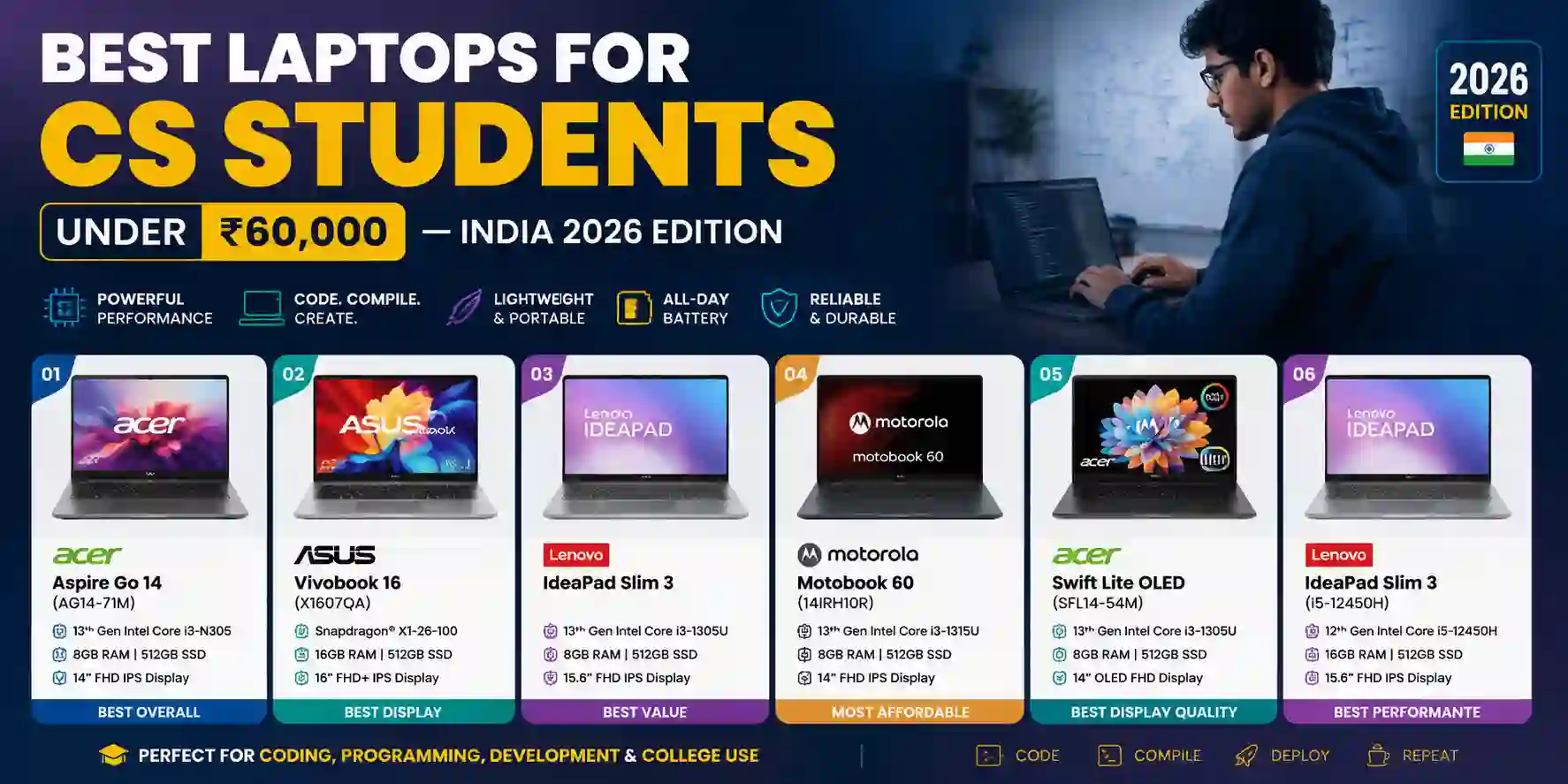
| Laptop | Processor | RAM | Storage | Battery | Weight | Price (approx.) | Rating |
|---|---|---|---|---|---|---|---|
| Acer Aspire Go 14 (AG14-71M) | Intel Core Ultra 5 125H | 16GB DDR5 | 512GB NVMe | ~7h 48m (tested) | 1.50 kg | ₹52,990–₹55,903 | ⭐ 4.8/5 |
| TOP PICKASUS Vivobook 16 (X1607QA) | Snapdragon X X1-26-100 | 16GB LPDDR5X | 512GB NVMe | ~20h (real-world) | 1.88 kg | ₹55,299–₹57,990 | ⭐ 4.7/5 |
| Lenovo IdeaPad Slim 3 (Snapdragon X) | Snapdragon X X1-26-100 | 16GB LPDDR5X | 512GB NVMe | ~18h (claimed) | 1.46 kg | ~₹57,990–₹60,990 | ⭐ 4.6/5 |
| Motorola Motobook 60 (14IRH10R) | Intel Core 5 210H | 16GB DDR5 | 512GB NVMe | ~7–9h | 1.39 kg | ~₹56,990 | ⭐ 4.5/5 |
| Acer Swift Lite OLED (SFL14-54M) | Intel Core Ultra 5 115U | 16GB LPDDR5 | 512GB NVMe | ~10–12h | 0.99–1.10 kg | ~₹58,990 | ⭐ 4.4/5 |
| Lenovo IdeaPad Slim 3 (i5-12450H) | Intel Core i5-12450H | 16GB DDR4 | 512GB NVMe | ~6–7h | 1.62 kg | ~₹55,990–₹58,990 | ⭐ 4.3/5 |
What a CS Student Actually Needs From a Laptop
Before the laptop reviews, a framework. The requirements of a CS student in India differ from a casual user in ways that matter at this budget:
16GB RAM is non-negotiable on Windows. Running VS Code with extensions, a browser with eight tabs, a local Node or Python server, and a terminal session simultaneously is a normal CS workload. 8GB runs out quickly and the system starts paging to disk, making everything sluggish. The only exception is macOS on Apple Silicon, where unified memory architecture and superior memory management make 8GB punch significantly above its weight.
SSD speed matters more than size. A 512GB NVMe SSD loads VS Code and project files in under two seconds. A 256GB SSD is too small for a full semester — you fill it with OS, tools, projects, and media faster than you expect. All recommendations here have 512GB minimum.
Battery life determines your actual workflow. A laptop with 5-hour battery means you carry a charger everywhere or park near a socket. A laptop with 14-plus hours means you work through a full day of lectures, lab sessions, and evening study without thinking about power. At this budget, the Snapdragon X machines change the battery calculus completely.
x86 compatibility is a real concern for Snapdragon machines. Most CS tools run fine on ARM via emulation or native ARM builds. The edge cases: VirtualBox has known issues on Snapdragon X (use WSL2 instead), some MATLAB toolboxes require Windows x86, and a small number of university lab software packages distributed as x86-only .exe files will not run. Check your specific curriculum's tool requirements before buying ARM.
Display quality affects eight-hour study days. A 16:10 aspect ratio gives more vertical screen space than 16:9 — meaningfully better for code and document editing. 1920×1200 at 14 inches gives 162 PPI, comfortable for extended sessions. OLED panels are available at this budget now (Acer Swift Lite) and deliver significantly better contrast and colour than IPS.
#1 — Acer Aspire Go 14 (AG14-71M): Best Overall for CS Students
Price: ₹52,990 (512GB) | ₹58,990 (1TB) on Amazon India
The Acer Aspire Go 14 is the laptop I would recommend to most CS students in India in 2026 without qualification. The combination of Intel Core Ultra 5 125H, 16GB DDR5, a 14-inch 1920×1200 IPS display in 16:10, and a 1.50 kg chassis at ₹52,990 is simply the best value equation in this segment.
The Core Ultra 5 125H is a 14-core (4P + 8E + 2LP-E) processor with a 4.5GHz boost clock. The PCMark 10 score of 6,133 in 91Mobiles testing places it solidly in the high-productivity tier for this budget — faster than anything with a Snapdragon X X1-26-100 in multi-thread workloads. For compilation-heavy workflows, Android Studio with x86 emulation, and running virtual machines, the x86 architecture with strong multi-thread performance is the right choice.
The 16:10 display is the specification most students underestimate until they have used it for a week. More vertical space means seeing more code, more of a document, or more of a terminal session without scrolling. At 162 PPI on a 14-inch panel, text is sharp and comfortable for long sessions.
Pros
- Core Ultra 5 125H delivers the strongest x86 multi-thread performance in this budget segment
- 16GB DDR5 + 512GB NVMe handles full CS workloads — compilers, Android Studio, multiple dev servers
- 16:10 WUXGA display at 162 PPI is excellent for code and document-heavy academic work
- 1.50 kg and 17.5mm thin — genuinely daily-carry portable for a 14-inch productivity machine
Cons
- No USB-C charging — charges only via the proprietary barrel connector, a real inconvenience in 2026
- Display brightness at 300 nits struggles in bright outdoor environments like college canteens
- Integrated Intel Arc graphics handles light gaming (Valorant at 152 FPS tested) but not AAA titles
- Fan noise under sustained load is audible — not disruptive but noticeable in quiet library settings
Who should buy this: CS students who need reliable x86 compatibility for all course software, run Android Studio or VMs as part of their curriculum, and want the strongest all-round performer at the lowest price in this list. The ₹52,990 price point makes it the best-value laptop in the segment.
Who should look elsewhere: Students who commute long distances and need 12-plus hours of battery. The tested 7h 48m PCMark 10 battery score means real-world usage with brightness up and code running is closer to 6–7 hours — carry a charger for full-day use.
#2 — ASUS Vivobook 16 (X1607QA): Best Battery Life, Best for All-Day Use
Price: ₹55,299–₹57,990 on Amazon/Flipkart
The ASUS Vivobook 16 is a Copilot+ PC designed for next-gen computing, powered by Qualcomm's Snapdragon X Series processor built on ARM64, featuring a 45 TOPS NPU, 16GB DDR5 RAM, 512GB M.2 SSD, and all-day battery life. ASUS tested the battery at up to 27 hours on video playback; real-world heavy use brings this closer to 20 hours.
The 16-inch 1920×1200 IPS panel in 16:10 on a laptop at this price is unusual — you get significantly more screen space than the standard 15.6-inch 16:9 laptops at similar prices, which matters for code editing and having a reference document open alongside your editor. The 16:10 aspect ratio and big display space makes a meaningful difference while multitasking or working with multiple documents open, though the 60Hz refresh rate, 45% NTSC color coverage, and 300 nits brightness means it is more functional than versatile — indoor use is comfortable, but it struggles in bright outdoor environments.
The Snapdragon X X1-26-100's real-world ARM compatibility for CS tools is broadly good in 2026: VS Code (native ARM build), Python, Node.js, Git, Java, Chrome, Firefox, Zoom, Discord, and most common developer tools work without issues. For web development, Python, Java, data science, and most programming tasks, the Snapdragon X is excellent. Students needing Windows-only software such as AutoCAD full version, MATLAB with specific Windows plugins, or SolidWorks should choose a Windows x86 laptop instead.
Pros
- 20-plus hours real-world battery eliminates charger anxiety for full college days
- 16-inch 16:10 display gives significantly more screen real estate than 15.6-inch competitors
- 45 TOPS NPU for on-device AI features — the only Copilot+ PC in this price segment
- Wi-Fi 6E and USB4 Gen 3 Type-C ports future-proof connectivity beyond most competitors here
Cons
- ARM architecture — verify all course-specific tools (MATLAB toolboxes, lab software) for compatibility
- Snapdragon X X1-26-100 is weaker in multi-thread CPU benchmarks than Core Ultra 5 125H
- 1.88 kg is the heaviest in this list — noticeable on long commutes with a full backpack
- 45% NTSC color coverage means colours look dull — unsuitable for design or color-grading work
Who should buy this: Students who commute by metro or bus daily and cannot always find a charging point. If your workflow is primarily coding, browsing, note-taking, and video calls — and you have confirmed your course tools have ARM-compatible versions — the battery advantage of the Vivobook 16 is transformative. Running 20-plus hours without a charger changes how you experience college.
Who should look elsewhere: Students whose curriculum requires VirtualBox, x86-only MATLAB configurations, or any legacy Windows software distributed as x86-only executables. The 1.88 kg weight also makes it the least portable option in this list despite its battery advantage.
#3 — Lenovo IdeaPad Slim 3 (Snapdragon X, 83N3002QIN): Best Portability With ARM Battery
Price: ~₹57,990–₹60,990 (slightly above strict ₹60K budget but often on sale below)
The Lenovo IdeaPad Slim 3 with Snapdragon X offers the same ARM architecture advantages as the ASUS Vivobook 16 — long battery, 45 TOPS NPU, Copilot+ features — in a significantly lighter and more portable 14-inch chassis at 1.46 kg. For students who want Snapdragon X's battery advantages in a form factor closer to the Acer's portability, this is the answer.
The 14-inch FHD display is the standard 1920×1080 in 16:9 — a step down from the ASUS's 16:10 display and the Acer's 1920×1200 in terms of vertical screen space, but perfectly adequate for daily use. Lenovo's keyboard quality on the IdeaPad Slim line is consistently one of the better typing experiences in the budget segment — a detail that matters after four years of typing assignments, code, and exam answers.
The same ARM compatibility caveat as the Vivobook 16 applies here: check your specific course software before buying. The battery life advantage — 18-plus hours claimed, typically 12–15 hours in real mixed use — makes the compatibility research worth doing for most students.
Pros
- 1.46 kg — significantly lighter than the Vivobook 16 with comparable Snapdragon X battery advantages
- Lenovo keyboard quality is among the best in the budget segment — excellent for extended typing
- Snapdragon X 45 TOPS NPU makes it a Copilot+ PC with on-device AI processing
- USB-C charging means any compatible charger or power bank works — no proprietary barrel connector
Cons
- 16:9 FHD display instead of the 16:10 WUXGA in the Acer and ASUS — less vertical screen space for code
- Same ARM compatibility concerns as the Vivobook 16 — x86 VMs and some lab software may not run
- Slightly above ₹60,000 at standard retail — requires a sale or coupon to stay within budget
- Lenovo IdeaPad build quality uses more plastic than the Motorola Motobook's metal elements
Who should buy this: Students who want Snapdragon X's battery life in a lighter, 14-inch form factor closer to the Acer's portability. The ARM compatibility trade-off is identical to the Vivobook 16, but the weight advantage over the Vivobook is meaningful for daily commuters who want a compact machine.
#4 — Motorola Motobook 60 (14IRH10R): Best Build Quality Under ₹57,000
Price: ~₹56,990
The Motorola Motobook 60 is an underrated option in this segment that consistently appears in best-of lists but rarely gets the visibility it deserves. The Intel Core 5 210H (Intel's 13th-generation, rebranded from Core i5-13th Gen architecture) with 16GB DDR5 and 512GB NVMe SSD is a competitive performer for x86 workloads, and the 1.39 kg chassis is the second-lightest in this list.
The design language is more premium than the competition at this price — the Motobook 60 uses a metal lid and a generally more solid-feeling build than the plastic-dominant Acer and ASUS options. For students who factor in build quality and longevity as primary considerations — a machine that needs to survive four years of daily use, backpack commutes, and the occasional coffee shop bump — the Motobook's construction stands out.
Motorola being a Lenovo subsidiary means the underlying hardware design quality is solid, and the warranty support network in India is more established than it was when Motorola first entered the laptop market. The Intel x86 architecture means zero compatibility concerns — every tool CS programs use in India runs without question.
Pros
- 1.39 kg is the second-lightest option in this list — excellent daily portability
- Metal lid build quality is more premium and durable than plastic competitors at this price
- Intel x86 — zero compatibility concerns for any CS lab software, VMs, or MATLAB configurations
- Competitive pricing at ~₹56,990 with 16GB DDR5 and 512GB NVMe included
Cons
- Intel Core 5 210H is a 13th-gen architecture — a generation behind the Core Ultra 5 in efficiency
- Battery life of 7–9 hours is similar to the Acer — carry a charger for full-day college use
- Motorola laptop brand is newer in India — service centers less widespread than Acer/Lenovo/ASUS
- Display is standard 1080p 16:9 — no 16:10 advantage like the Acer and ASUS options
Who should buy this: Students who prioritize build quality and portability equally, want x86 compatibility without ARM trade-offs, and find the Acer Aspire Go's lack of USB-C charging a dealbreaker. The Motobook's lighter weight and more premium feel at a competitive price make it the pick for students who carry their laptop extensively.
#5 — Acer Swift Lite OLED (SFL14-54M): Best Display in the Budget
Price: ~₹58,990
The Acer Swift Lite OLED SFL14-54M at just 0.99–1.10 kg is the lightest laptop in this budget segment — an excellent option for students who commute by bus or train daily. The Intel Core Ultra 5 115U (a lower-TDP Ultra series chip compared to the 125H in the Aspire Go 14) paired with 16GB and a 512GB SSD handles the CS student workload adequately, though compile-heavy and VM workloads will feel the difference versus the 125H.
The headline feature is the OLED display — a panel technology that delivers perfect blacks, infinite contrast ratio, and significantly richer colours than any IPS panel at this budget. For students who consume a lot of media, work with design elements, or simply spend long hours at the screen, the OLED display quality difference over IPS is noticeable every day. It is the best display in this price bracket by a meaningful margin.
The weight at under 1.1 kg is genuinely remarkable — no other laptop in this list comes close. For students who walk long distances between campus buildings or use public transport, a sub-1.1 kg machine changes the physical experience of carrying a laptop every day.
Pros
- OLED display delivers visibly superior contrast, colour, and viewing angles versus every IPS option here
- Under 1.1 kg — the lightest laptop in this segment by a significant margin
- Intel Core Ultra 5 115U is efficient enough for most CS student workloads
- x86 architecture — full compatibility with all course software, VMs, and tools
Cons
- Core Ultra 5 115U is a lower-TDP chip — noticeably slower than 125H for compilation and VMs
- Battery life of 10–12 hours is better than Acer Aspire Go but weaker than Snapdragon machines
- ₹58,990 pricing makes it the most expensive x86 option here — premium is for OLED and weight
- OLED burn-in is a theoretical long-term concern for static interfaces like IDE toolbars
Who should buy this: Students who commute extensively and weight is the primary constraint, or students who spend significant time on creative coursework and media consumption where the OLED display's visual quality creates a meaningful daily difference. Not the choice for pure performance — the Core Ultra 5 115U is noticeably slower than the 125H under heavy load.
#6 — Lenovo IdeaPad Slim 3 (i5-12450H): Best Budget x86 with Upgradeable RAM
Price: ~₹55,990–₹58,990
The IdeaPad Slim 3 with Intel Core i5-12450H is the known quantity in this list — a 12th-gen Intel processor that has been thoroughly reviewed, widely available in India, and known to run every piece of CS software without question. Its key advantage over the other x86 options is upgradeable RAM: the DDR4 slots can be upgraded to 32GB, which matters for students who plan to run Docker containers, heavier VMs, or machine learning workloads as their curriculum progresses.
At ₹55,990–₹58,990 for the 16GB + 512GB configuration, it is not the cheapest option here, and the 12th-gen Core i5 is a generation older than the Core Ultra 5 125H and Core 5 210H alternatives. The battery life of 6–7 hours in real use is the weakest in this list. Buy this if RAM upgradability is a priority for your specific curriculum or if the Core Ultra 5 125H options are out of stock.
Pros
- Dual RAM slots — upgradeable to 32GB, the only option in this list with meaningful RAM expansion
- 12th-gen Core i5-12450H is fully tested and compatible with every CS tool used in Indian colleges
- Widely available across India — service network and spare parts ecosystem are mature
- 15.6-inch 1080p display is comfortable for extended use with more screen area than 14-inch options
Cons
- 6–7 hours real battery is the weakest in this list — charger required for any full college day
- 12th-gen Intel architecture is older than Core Ultra 5 alternatives at similar prices
- DDR4 RAM is slower than DDR5 in newer Intel and Snapdragon machines
- 1.62 kg and thicker chassis — less portable than the Acer Aspire Go at a similar price
The Buying Decision Framework: How to Choose
Rather than a one-size-fits-all recommendation, here is the honest decision tree based on what matters most to you:
If your college's software includes VirtualBox, specific MATLAB toolboxes, or any x86-only Windows executables: Buy the Acer Aspire Go 14 (AG14-71M). The Core Ultra 5 125H's x86 compatibility and multi-thread performance handle every CS curriculum tool, and the ₹52,990 price is the best value in the segment.
If you commute long distances and battery life is the primary constraint: Buy the ASUS Vivobook 16 (X1607QA) after confirming your course tools are ARM-compatible. Twenty-plus hours of real battery changes how you experience a full college day. The Lenovo IdeaPad Slim 3 Snapdragon X is the lighter-weight alternative for the same battery advantage.
If weight is the most important factor: The Acer Swift Lite OLED at under 1.1 kg is the answer — with the trade-off of a lower-TDP processor and a ₹58,990 price for the OLED and weight premium.
If you want to upgrade RAM later for ML workloads: The Lenovo IdeaPad Slim 3 (i5-12450H) with its upgradeable DDR4 slots is the only option in this segment with meaningful RAM expansion headroom.
If build quality and portability matter equally and you want x86: The Motorola Motobook 60 at ~₹56,990 offers the best combination of metal build quality, 1.39 kg weight, and full x86 compatibility.
The Snapdragon X Question: Should CS Students Trust ARM in 2026?
This is the most common question in India's laptop buying communities right now, and it deserves a direct answer.
In general, Snapdragon X laptops are safe to buy in India in 2026 for most students. All major applications — Chrome, Microsoft Office, VS Code, Zoom, Discord, Python, Java, Android Studio — run natively or through Prism emulation without problems.
The edge cases that matter for CS students specifically: VirtualBox does not work reliably on Snapdragon X — use WSL2 (Windows Subsystem for Linux) instead, which runs natively and efficiently on ARM. Docker with WSL2 backend works. VMware has ARM-compatible versions. x86 Android emulation in Android Studio has compatibility gaps — if your mobile development coursework requires x86 Android emulator targets, test before buying. Most modern Android Studio projects targeting physical devices or ARM-based emulators work fine.
The recommendation: visit your college's lab, ask your seniors which tools your semester courses use, and check whether those tools have ARM-compatible versions. If any critical tool is x86-only with no ARM alternative, buy the Acer Aspire Go 14. If all your tools are covered, the battery advantage of Snapdragon X is genuinely worth considering.
What to Look for When Prices Change (Sale Season Strategy)
Laptop prices in India fluctuate significantly around Amazon and Flipkart sale events — Republic Day (January), Amazon Prime Day (July), and the Great Indian Festival (October) regularly see ₹3,000–₹8,000 discounts on the laptops in this list. The Acer Aspire Go 14, which launched at higher prices, was available at ₹52,990 on Amazon — a price that makes it the strongest value in the segment.
Set price alerts on Smartprix or 91Mobiles for the specific SKU you want. The 512GB and 1TB variants of the same model can differ by ₹4,000–₹6,000 — buying the 512GB version and adding an external SSD later is often cheaper than buying the 1TB variant upfront if storage is the only difference.
Check the exact model number before buying. Indian retail carries multiple SKUs of the same laptop name with different RAM, storage, and occasionally different display panels. "Acer Aspire Go 14" describes several configurations — the AG14-71M with Core Ultra 5 125H and 16GB DDR5 is specifically what the recommendation in this guide refers to.
The CS Student Laptop Setup Beyond the Machine
The laptop is the foundation, but the setup that makes you productive across four years of CS involves a few additions that are worth budgeting for:
A good pair of IEM earphones for lecture recordings and focus sessions — ₹1,500–₹3,000. A laptop stand or riser for dorm room desk use — ₹500–₹1,500. An external mouse — wrist health across four years of coding matters. A 65W GaN USB-C charger for laptops that support USB-C charging — smaller than most laptop bricks and charges your phone simultaneously.
The software stack is equally important. VS Code with the right extensions, GitHub Student Pack for free Copilot access, and the AI tools covered across this blog — from the best AI coding tools for 2026 to GitHub Copilot set up via the Student Developer Pack — multiply the productivity of whatever hardware you buy. A ₹52,990 laptop with a well-configured AI-assisted development environment outperforms a ₹1,20,000 laptop with none.
The Final Recommendation for Most CS Students in India
Buy the Acer Aspire Go 14 (AG14-71M) at ₹52,990–₹55,903 on Amazon. The Core Ultra 5 125H, 16GB DDR5, 512GB NVMe, 16:10 WUXGA display, and 1.50 kg chassis is the best combination of performance, compatibility, display quality, and portability at this budget. It runs every piece of CS software used in Indian college curricula without question, handles Android Studio and moderate VM workloads, and leaves ₹4,000–₹7,000 in your budget for accessories and the GitHub Student Pack. If long battery is your top priority and you have confirmed ARM compatibility for your tools — choose the ASUS Vivobook 16 (X1607QA) at ₹55,299–₹57,990. The 20-plus hour battery is a genuine quality-of-life upgrade for students who spend full days on campus without reliable power access.
Final Thoughts
The ₹45,000–₹60,000 laptop segment in India in 2026 is the best it has ever been for CS students. You now have access to Intel Core Ultra, AMD Ryzen 8000, and Snapdragon X — three genuinely different processor architectures each with compelling reasons to choose them — in machines light enough to carry daily, powerful enough for a full CS curriculum, and priced within a student's realistic budget.
The Acer Aspire Go 14 wins on value and compatibility. The ASUS Vivobook 16 wins on battery. The Motorola Motobook 60 wins on build quality and portability. The Acer Swift Lite wins on display and weight. None of them is wrong — the right choice depends on what your specific four years of CS demands.
Whatever you buy: activate the GitHub Student Pack on day one, set up VS Code with Copilot, and treat the AI tools covered in this blog's guides as part of your standard setup. The machine is the foundation. The tools are the multiplier.