The Diagram Nobody Drew Because Drawing It Was Too Slow
In my capstone project, my teammates and I constructed a microservices backend to implement a distributed task queue system. We had five microservices, a messaging system, two databases, a caching tier, and an API Gateway. Each time we reported to our mentor about our progress, she asked us the same question: "Do you have something that explains how your services communicate?"
We understood our system architecture very well. We had implemented our architecture ourselves. Explaining it orally required five minutes and made everybody confused. Creating it on paper in Lucidchart required at least another twenty minutes of box and arrow drag-and-drop actions. We never did that. We just explained our system architecture and lost everyone in confusion.
I put our service file structure and a brief description of our messaging architecture two days before our final review in Claude and wrote the prompt, "draw a Mermaid.js sequence diagram showing a flow of submitting a task through the API gateway, queuing the task via the message broker, fetching it from the worker service, and reporting status to the client."
After forty seconds, I received a fully formed Mermaid.js diagram. I copied the code and added it to our GitHub README file enclosed in a code block. It was instantly rendered. Our advisor reviewed the diagram for thirty seconds and told us he finally understood the architecture. The three-month-long confusing discussion was solved in thirty seconds through one diagram that took only forty seconds to generate.
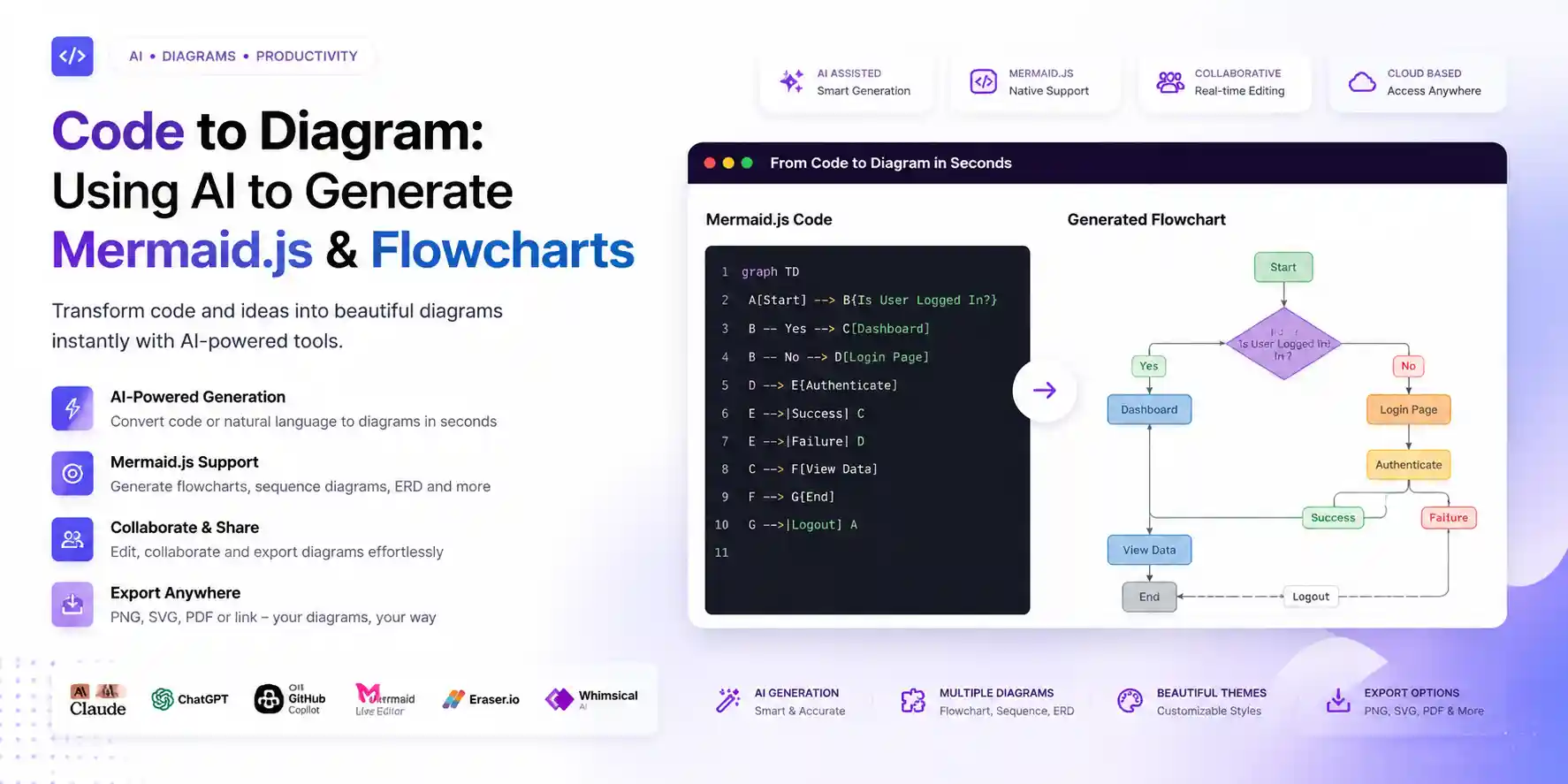
This article provides a comprehensive overview of this process - using artificial intelligence to draw all important types of Mermaid.js diagrams based on plain English input and exact prompts to receive accurate results, together with the tools necessary to render the generated diagrams.
| Tool | Best For | Mermaid Accuracy | Renders Preview | Price | Rating |
|---|---|---|---|---|---|
| Claude | Complex multi-node diagrams + syntax accuracy | ⭐⭐⭐⭐⭐ | ❌ External | Free / $20 Pro | ⭐ 4.9/5 |
| TOP PICKChatGPT (GPT-4o) | Iterative refinement + diagram explanation | ⭐⭐⭐⭐ | ❌ External | Free / $20 mo | ⭐ 4.7/5 |
| GitHub Copilot | Inline Mermaid in markdown files | ⭐⭐⭐⭐ | ⚠️ With extension | Free (Student Pack) | ⭐ 4.6/5 |
| Mermaid Live Editor | Validate, preview, and export diagrams | N/A (renderer) | ✅ Native | Free | ⭐ 4.8/5 |
| Eraser.io | AI diagram generation with live canvas | ⭐⭐⭐⭐ | ✅ Native | Free / $12 mo | ⭐ 4.5/5 |
| Whimsical AI | Flowcharts and wireframes from description | ⭐⭐⭐ | ✅ Native | Free / $10 mo | ⭐ 4.3/5 |
Why Mermaid.js Is the Right Format for Developer Diagrams
Before covering the AI generation workflow, it is worth being precise about why Mermaid specifically — rather than Lucidchart, Draw.io, Figma, or any other diagramming tool.
Diagrams as code. Prior to talking about the workflow for the AI-generated diagrams, it is worthwhile to discuss why Mermaid as opposed to Lucidchart, Draw.io, Figma, and any other diagramming software. This is because Mermaid diagrams are stored in text form. They can be included in the same source file as your code. If there is an update in the system architecture, you will make changes to the text instead of opening a Lucidchart file, re-dragging the arrows, exporting a PNG file, uploading it and committing the blob.
Native rendering where developers already are. Mermaid diagrams are automatically rendered within triple backticks with the tag mermaid in GitHub's README files. This feature works in GitLab, Notion, Obsidian, Confluence (with an add-on), and Visual Studio Code with Mermaid installed. The diagrams show up right there in the documentation where they belong — not some image file buried in an attachment somewhere else.
AI makes the syntax irrelevant. The only past issue with Mermaid is that its syntax was a challenge to learn. The arrow syntax, node symbols, subgraph notation, order of participants in sequence diagrams—memorizing them while simultaneously keeping track of the design it represents is quite difficult. With AI, there is no such cognitive load anymore. Just describe what you want to be drawn in plain English; AI generates the syntax for Mermaid.
With this combination — source control for text, native drawing to the platform, and AI-suggested syntax generation — Mermaid emerges as the superior format for creating diagrams in developer documentation in 2026. Where Mermaid does not beat out visual editing software in use cases is when pixel control becomes necessary (i.e., presentations), and when spatial design becomes important (i.e., complex network topology). Otherwise, Mermaid is better suited for anything a developer might be doing.
As for students who happen to be creating technical documentation on top of diagrams, this process aligns perfectly with our coverage of the best AI tools for technical documentation in 2026.
The Six Mermaid Diagram Types and When to Use Each
Mermaid can be used to generate many more diagrams than most people think. Below is an outline of what diagrams can be generated based on their respective use cases, with prompts included for each.
1. Flowcharts — Logic and Process Flow
Use for: Decision trees, algorithm logic, business process flows, conditional branching in code, onboarding flows, and any "if this then that" structure.
Mermaid type: flowchart TD (top-down) or flowchart LR (left-right)
AI prompt structure:
Generate a Mermaid.js flowchart (flowchart TD) showing [process name].
The flow starts with [starting point].
Decision points: [list decisions and their yes/no outcomes].
The flow ends at [end states].
Use descriptive node labels, not single letters.
Example prompt to Claude: "Create a flowchart using Mermaid.js that shows how users can authenticate in a web application. Start by having the user enter their login credentials. If the credentials entered are valid, continue. Otherwise, display an error message and go back to the previous form. If two-factor authentication is enabled, send out the OTP and verify the OTP. Once verified, create a session. If two-factor authentication is not required, proceed to creating a session. End with a redirect to the dashboard."
What you get:
flowchart TD
    A([User Submits Credentials]) --> B{Valid Credentials?}
    B -- No --> C[Show Error Message]
    C --> A
    B -- Yes --> D{2FA Enabled?}
    D -- No --> G[Create Session]
    D -- Yes --> E[Send OTP]
    E --> F{OTP Valid?}
    F -- No --> E2[Show OTP Error]
    E2 --> E
    F -- Yes --> G
    G --> H([Redirect to Dashboard])
2. Sequence Diagrams — Service and API Communication
Use for: API request-response flows, microservice interactions, WebSocket message flows, database query sequences, authentication protocols, and any interaction that involves timing and order between multiple actors.
Mermaid type: sequenceDiagram
AI prompt structure:
Generate a Mermaid.js sequenceDiagram showing [interaction name].
Participants: [list all actors/services involved].
Flow: [describe each step in order — who sends what to whom, what responses come back].
Include any async operations, loops, or error paths.
Example prompt: "Create a REST API flow for file upload using Mermaid.js sequenceDiagram. Participants: Client, API Gateway, Auth Service, Storage Service, Database. Flow: Client invokes POST /upload request with an authentication token to API Gateway. Gateway requests validation of token from Auth Service – if validation fails, send back a 401 status code to the Client. Else, forward the file to Storage Service for uploading and obtain the file URL. Save file metadata (file URL, user ID, date-time stamp) to Database. Return a 200 status code with file URL to Client."
3. Entity Relationship Diagrams — Database Schema
Use for: Database schema visualization, data model documentation, showing relationships between tables, and explaining foreign key structures to non-technical stakeholders.
Mermaid type: erDiagram
AI prompt structure:
Generate a Mermaid.js erDiagram for a [domain] database.
Tables: [list table names].
For each table, list the key columns with data types.
Relationships: [describe foreign key relationships — one-to-many, many-to-many, etc.]
Works best with your existing code: Just copy the SQL CREATE TABLE commands and prompt Claude to generate a Mermaid.js erDiagram based on those SQL schema definitions, including all tables, primary keys, and relationships among them. Claude will read the schemas and return the correct ER diagram within seconds — exactly the same process described in our guide to the best AI SQL generators.
4. Class Diagrams — Object-Oriented Structure
Use for: OOP class hierarchies, interface implementations, design pattern documentation, and explaining code architecture to teammates or in technical documentation.
Mermaid type: classDiagram
AI prompt structure:
Generate a Mermaid.js classDiagram showing [system name].
Classes: [list class names with their key attributes and methods].
Relationships: [inheritance, composition, association, dependency].
Best way to use with your own classes: Just copy and paste your class definitions and write the prompt: "Create a Mermaid.js classDiagram using the above class definitions. Draw inheritance hierarchy, methods, and attribute information." This approach can be especially helpful in documenting your code before you refactor it.
5. Git Graphs — Branch and Merge History
Use for: Visualizing Git branching strategies, explaining GitFlow or trunk-based development, documenting a release process, and teaching Git workflows to junior team members.
Mermaid type: gitGraph
AI prompt structure:
Generate a Mermaid.js gitGraph showing [branch strategy name].
Main branches: [list permanent branches].
Feature flow: [describe how features are branched, developed, and merged].
Include a release cycle if relevant.
6. State Diagrams — Application State Machines
Use for: UI state machines, order processing workflows, WebSocket connection states, media player states, and any system that transitions between discrete states based on events.
Mermaid type: stateDiagram-v2
AI prompt structure:
Generate a Mermaid.js stateDiagram-v2 for [system name].
States: [list all possible states].
Transitions: [describe what event causes each state transition].
Mark the initial and final states.
Claude: The Best AI for Mermaid Generation
The syntactic accuracy of Mermaid diagrams generated by Claude is unparalleled in AI models designed to generate diagrams from text descriptions. Syntactic accuracy is crucial since some Mermaid renderers will ignore errors silently while others will return empty images on syntax errors, such as placing an arrow at the wrong location or putting a double quote into a node label instead of a single quote.
Why Claude leads on Mermaid specifically: Claude is excellent at following multi-criteria instructions. If your prompt says "use descriptive node labels, put services inside subgraphs, depict error paths in red-styled nodes, and use LR direction," Claude will follow all four constraints at once. Other language models often ignore one or two constraints on more complex prompts.
The code-to-diagram workflow: Claude shines in this workflow the most. Copy a function, class, API handler, module imports, etc., and ask Claude to draw a diagram for that snippet. Claude understands what each line means in terms of decision-making flow or transformation logic and produces a proper diagram based on your input code.
Example — code to flowchart:
Paste this Python function:
def process_payment(amount, card_token, user_id):
    if amount <= 0:
        raise ValueError("Amount must be positive")

    card = verify_card(card_token)
    if not card.is_valid:
        return {"status": "failed", "reason": "invalid_card"}

    if card.balance < amount:
        return {"status": "failed", "reason": "insufficient_funds"}

    transaction = charge_card(card, amount)
    save_transaction(transaction, user_id)
    send_receipt(user_id, transaction)

    return {"status": "success", "transaction_id": transaction.id}
And ask: "Generate a Mermaid.js flowchart TD from this Python function. Show every decision point, each return path, and the sequence of operations on the success path. Use descriptive labels that a non-developer could read."
Claude produces a flowchart that maps every branch — including the ValueError raise path most developers forget to document — with readable labels rather than code-syntax labels.
Pros
- Most precise output from Mermaid in syntax – fewer failures in silent rendering of complicated diagrams
- Translation to diagrams follows logic of functions, and not their shape only
- Can apply multiple constraint rules simultaneously to diagrams – subgraphs, style and direction
- Interprets its own diagrams explaining diagram structure generated
Cons
- Does not have any built-in Mermaid preview — need to copy-paste the output on mermaid.live to check before use
- Free-tier usage limitations might disrupt a lengthy diagramming process across all diagramming types
- In large systems with more than 30 nodes, it creates diagrams that can be rendered but not readable
- Does not have any direct PNG/SVG export capabilities — requires mermaid.live or documentation platforms
ChatGPT: Best for Iterative Diagram Refinement
The superiority of ChatGPT for generating Mermaid code is the same as that for debugging SQL, which is due to the iterative process that can be repeated multiple times. Start off with the creation of the initial Mermaid code, copy the error generated by the Mermaid Live Editor into ChatGPT, or explain how the current version looks.
The refinement workflow:
Turn 1: "Generate a Mermaid.js sequence diagram for [description]."
Turn 2 (after seeing the output): "The Auth Service response step is missing. After the Gateway calls Auth Service and gets a valid response, add a step where Auth Service logs the validation to the Audit Database before returning to Gateway."
Turn 3: "The diagram is getting wide. Group the Auth Service and Audit Database as participants on the right side and add a note above them labeling the section 'Authentication Layer'."
This step-by-step improvement process, which would need to be done from the beginning with all visual software applications, is quite common in the ChatGPT dialogue application. At the fifth round, the figure becomes what is needed without making any changes manually to the Mermaid code.
Pros
- Multi-turn refinement allows adding, deleting, and modifying diagram elements while maintaining context
- Describes the function of each Mermaid syntax element — helpful for programmers learning the syntax
- Diagram conversion capability — change a flowchart into a sequence diagram for the same scenario
- Very good at producing test cases for diagrams — 'what edge cases might be missed by this flow?'
Cons
- Lower accuracy on initial attempt syntax compared to Claude for complex multi-node diagrams
- Free version rate limits affect extended diagramming sessions that involve multiple iterations
- No preview tool available – need to validate using mermaid.live after each iteration
- Tendency to overcomplicate simple diagrams if the prompt scope is too broad
GitHub Copilot: Mermaid Inline in Your Documentation
In particular, the ability of Copilot to generate diagrams with Mermaid is highly beneficial if you are writing documentation or READMEs within your editor and require a diagram to coexist with the text you are writing. Just like with generating code and regex patterns, which is explained in our tutorial on AI-driven regex generation, there is no context switch when generating diagrams with Mermaid.
The inline workflow: In a markdown file, type a comment describing the diagram you want:
<!-- sequence diagram: user login flow with JWT token issuance -->
```mermaid
Following the first code fence, Copilot makes suggestions about Mermaid's content directly within the code. In cases where the flow diagrams are fairly common (such as authentication, create, read, update, delete [CRUD] actions, simple state machines), this advice can be trusted and accepted by pressing Tab to check later.
Best use case: Copilot rocks when it comes to commenting on code that you are currently writing. When you are building an API handler, include a markdown file into your README and let Copilot draw the respective sequence diagram of your endpoint. The diagram will be rendered directly in the documentation file and committed along with your code. It’s the perfect form of diagrams-as-code workflow.
Pros
- Zero context switches—Mermaid diagrams created on the fly right within your documentation file
- Naturally syncs with code you are writing in real-time—diagram and code are saved at the same time
- Free to students through the GitHub Student Developer Pack
- Covers common diagram use cases accurately—authentication flows, CRUD operations, simple state machines
Cons
- A custom architecture diagram would require considerable manual modification after the first suggestion by Copilot
- Cannot display the preview automatically; a dedicated Mermaid Preview extension must be used
- Limited context only to the currently opened file and unaware of the entire codebase that the diagram represents
- Not dependable for complicated diagrams such as erDiagram and stateDiagram-v2
Eraser.io: The AI-Native Diagramming Canvas
Eraser.io adopts an entirely distinct methodology when compared to the aforementioned AI programs which deal with text inputs only. This program is specifically designed for creating diagrams. Its main advantage is the presence of integrated artificial intelligence that creates diagrams right on a living canvas – there is no need to paste anything into Mermaid Live like in the case with Claude.
Why it earns a place in this list: Eraser is built to understand native convention in engineering diagrams — it recognizes how a load balancer should look, how a message queue should be visualized, and where a CDN should go in your cloud architecture diagram. If you type in "three tier web architecture with React frontend, Node.js API, PostgreSQL database, and Redis cache," Eraser will give you an architectural diagram right out of an architecture document.
Best Feature: The code to diagram option will work on reading the source code files. You can connect your GitHub account and ask Eraser to create a diagram of a certain file or module without having to describe the code structure; it will just read it. This makes it quicker to document an existing codebase.
Limitations: However, Eraser’s output does not consist of Mermaid code; rather, it is a custom format from the tool itself. However, if you require Mermaid specifically to render GitHub READMEs or work with Notion, then you will still have to rely on the workflows for Claude or ChatGPT.
The Complete Rendering Environment Guide
Generating Mermaid syntax is half the workflow. Knowing where to render it is the other half.
mermaid.live — The validation and preview step. All generated Mermaid diagrams need to be placed here first. The live editor allows you to see any syntax errors in the code, with line numbers highlighted; it will also allow you to edit the output before saving it. Furthermore, it is able to export the diagram to an image (PNG), SVG code, and a link that anyone can open.
GitHub READMEs — The primary documentation target. Wrap your Mermaid syntax in a code fence tagged mermaid:
```mermaid
flowchart TD
    A[Start] --> B[End]
```
GitHub renders this automatically. No plugin, no configuration, no image upload. The diagram lives as text in your repository and renders as a visual in the README. This is the canonical use case for Mermaid in developer workflows.
Notion — The team documentation target. Using Notion, you can render Mermaid diagrams natively by putting it in a code block using the /code tag and specifying the language as mermaid. Simply paste your Mermaid syntax into a code block and specify mermaid, and you'll have your diagram right there on your Notion page.
Obsidian — The personal knowledge base target. The Mermaid plugin (pre-installed in Obsidian) allows one to copy-paste Mermaid code into a code block within any Obsidian note and automatically generate images. For students who need to create a network of interconnected information from different subjects (a process that easily integrates with the NotebookLM learning system), Mermaid graphics within Obsidian notes will help visualize textual information.
VS Code — The in-editor preview target. Install Markdown Preview Mermaid Support Extension. Any .md file containing fenced Mermaid code generates diagrams in the preview window of VS Code. This provides both the in-place Copilot generation process and instant previewing within the same interface.
Confluence — The enterprise documentation target. Requires the Mermaid for Confluence plugin. Once installed, Mermaid code fences render as diagrams in Confluence pages. For teams already in Confluence, this is the standard integration.
Practical Workflows: Real Diagramming Tasks, AI-Assisted
Documenting a New API Endpoint
The task: You have just implemented a POST /orders endpoint that validates the request, checks inventory, processes payment, creates an order record, and sends a confirmation email.
The workflow: Open the README or API docs file. Make comments for the flow of the endpoint. Ask Claude or utilize the Copilot to generate a sequence diagram where the participants include: Client, API Handler, Inventory Service, Payment Service, Database, Email Service. Copy the generated diagram code from mermaid.live and ensure it works. Paste the code into your API documentation file. This is done within three minutes while saving you 20 minutes on drawing the sequence manually.
Explaining a System Architecture to a New Team Member
The task: A new developer joins your project and needs to understand how the services interact.
The workflow: Give a clear description of your architecture to Claude in simple language; mention all services, what they do, and how they communicate with each other. Request him to provide you with a flowchart LR of the architecture, wherein the subgraph is used to group the related services. The result will be automatically dumped into ARCHITECTURE.md file of your project.
Visualizing a Database Schema for a Non-Technical Stakeholder
The task: Your product manager wants to understand what data the system stores and how it relates.
The workflow: Copy the SQL code for your CREATE TABLE statements into Claude and request an ER diagram in Mermaid format with clear labeling for relationships. In the ERD, entities and relationships have meaningful names like "Customer makes many Orders," "Order consists of many Products," rather than just foreign keys. Save the ER diagram as a PNG from mermaid.live and include it in your stakeholder presentation. This is an organic next step in the AI SQL process flow, which was explored in our guide to AI SQL generators.
Creating a Study Diagram for a CS Concept
The task: You are studying OS scheduling algorithms and want a visual comparison of how FCFS, SJF, and Round Robin handle a process queue.
The workflow: Ask Claude: "Generate three Mermaid.js flowcharts — one each for FCFS, SJF, and Round Robin scheduling. Each should show how processes enter the ready queue, how the scheduler selects the next process, and when a context switch occurs." Paste all three diagrams into your NotebookLM study notebook as source text or into your Obsidian notes alongside your typed notes. Visual diagrams alongside text notes improve retention for spatial and process-oriented concepts — the same principle behind the NotebookLM study workflow.
Reviewing a Pull Request Architecture Change
The task: A team member has submitted a PR that changes the data flow between three services. You need to understand the before and after.
The workflow: Ask Claude to produce two diagrams illustrating the sequences in each of the old and new service architectures described in the existing README and the PR description respectively. The reviewer will be able to compare both diagrams without going through code diffs for hours looking for clues. Processes that would require up to an hour can be done in ten minutes with such diagrams.
The Prompts That Consistently Produce Accurate Mermaid Output
One of the major errors while generating AI Mermaid is that the prompt provided can be very vague, leading to a generalized diagram that does not depict your system correctly. The other major error comes from rendering the incorrect diagram due to the use of incorrect syntax in the prompt generated.
Always specify the Mermaid diagram type explicitly:
Do not say "create a diagram." Say "create a Mermaid.js sequenceDiagram" or "create a Mermaid.js flowchart LR." Without the type, the AI picks one that may not fit your use case.
List your actors, entities, or nodes by name: "Participants: Client, API Gateway, Auth Service, Database" gives Claude real names to use rather than generic "System A → System B" labels.
Describe the flow in numbered steps: "1. Client sends POST /login to API Gateway. 2. API Gateway calls Auth Service with credentials. 3. Auth Service checks Database..." — sequential numbering makes the arrow direction unambiguous.
Add styling constraints when readability matters: "Group the database services in a subgraph labeled 'Data Layer'. Use descriptive node shapes — rectangles for processes, diamonds for decisions, rounded rectangles for start/end states."
Ask for a syntax-only output: End your prompt with: "Return only the Mermaid syntax block, no explanation." This prevents the AI from wrapping the output in explanatory prose that you have to manually extract before pasting into mermaid.live.
What to Avoid: Common Mistakes With AI Diagram Generation
Not validating in mermaid.live before committing. The syntax generated by the AI for mermaid may at times have small bugs that can lead to incorrect results while rendering. Bugs such as a missing semicolon or an open bracket in the graph. They may be unnoticeable in the text but will definitely ruin the diagram. Always copy-paste the code to mermaid.live to check for bugs.
Generating one massive diagram instead of several focused ones. A single diagram attempting to represent the whole system architecture containing twenty services, thirty data flows, and all possible errors would turn out to be too complicated to understand. Instead of asking AI to produce one complex diagram, you should ask it to draw a family of diagrams dedicated to particular parts of the system.
Using diagrams as a substitute for documentation prose. Diagram represents structure. Diagram does not describe decision-making, alternatives, or reasoning process behind design choices. In case of architecture diagrams intended for developer consumption beyond your own team, the diagram needs to be accompanied by written justification – not a substitute for one. AI can produce both. Use the same workflow to generate diagram and then ask Claude for an explanatory paragraph.
Forgetting to update diagrams when code changes. Mermaid diagrams are text versions controlled, so they can be updated easily; however, this requires remembering to do so. The best way to handle this is to consider it part of the same task as updating the code, so adding a new service should also be accompanied by an update to the diagram at the same time. This should not take long enough with AI to make this impossible.
The Diagram Generation Workflow That Fits Every Developer
The combination of tools necessary to fulfill 90% of your diagramming needs is free and involves only tools you most likely already own. Utilize Claude for any complicated diagram based on your description or code – simply copy and paste, instruct, and receive perfectly fine-tuned Mermaid syntax. Test all the outputs in mermaid.live before finalizing them. Paste the validated syntax into GitHub READMEs for documentation of the project, Notion for your company's internal wiki, or Obsidian for taking study notes. Integrate GitHub Copilot (available free of charge with the Student Pack) to generate Mermaid syntax right within your documentation, next to your code. Four tools, totally free, for any type of diagram you may need – without ever having to draw anything.
Final Thoughts
The space between knowing an architecture and creating a visualization that communicates the architecture effectively to other people has always been friction, not difficult, but the effort of turning ideas into visuals. AI shrinks that space to zero.
The Mermaid process flow — describe the architecture in plain language, use Claude to create the diagram, verify it on mermaid.live, insert it into GitHub — takes four minutes where the previous method took forty. Even more importantly, the Mermaid process creates a visualization that is stored alongside the code as text, which means it can be updated through text edits instead of graphical user interface sessions.
The software engineers who will write the most effective technical documentation in the coming years will not be the engineers most comfortable drawing diagrams. Instead, they will be the software engineers most comfortable explaining their system designs with enough clarity that the artificial intelligence can render an accurate diagram from that explanation—and then evaluating that diagram with enough rigor to find the mistakes the artificial intelligence overlooked.
Both of those competencies are worth pursuing. Start by writing the next program. Explain what that program does. Ask Claude to generate a diagram of that system. If that diagram matches what you have written, congratulations, you have generated technical documentation. If that diagram does not match your program, that is an indication you should not overlook.