The Physical Notebook Problem That iPad Solved for Me
In my first year, I carried three physical notebooks — one for each major subject cluster. By mid-semester, they had expanded to five. Pages filled up in a disorganized sprawl because the lecture moved faster than I could write neatly. PDF slides from the professor were printed, annotated, and filed separately. When exam season arrived, my "notes" were spread across five notebooks, a folder of annotated printouts, a pile of random loose sheets, and my laptop's Downloads folder.
I switched to iPad with Apple Pencil at the start of second year, primarily because I was tired of carrying four kilograms of paper across campus. What I did not expect was how significantly the tools built around digital ink would change the quality of the notes themselves — not just their portability.
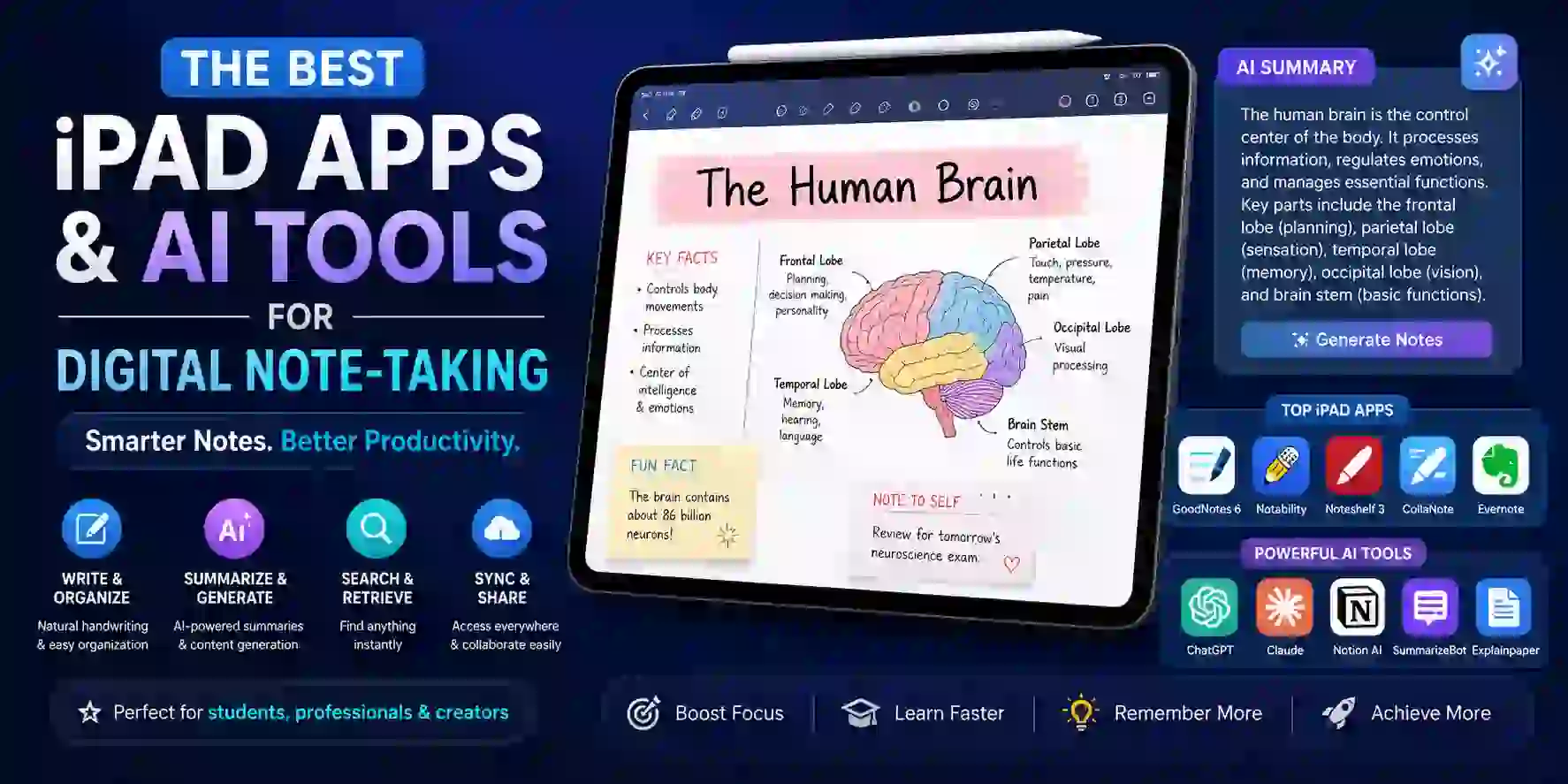
GoodNotes let me annotate directly on the professor's slides, adding my own diagrams and explanations in the margins without printing anything. Notability recorded the lecture audio and synced it to the exact word I was writing when the professor said something I would need to replay later. Nebo converted my handwritten derivations into clean typed text I could paste into my lab report. Apple Notes became my fast-capture inbox for ideas that did not need structure yet.
The iPad, in the right app, is not just a digital replacement for a notebook. With the AI features that have arrived in every major app since 2024, it is a system that actively helps you understand and remember what you captured.
This article is the complete guide to the best iPad note-taking apps and AI tools in 2026 — tested across real student workflows, ranked honestly on the features that matter for four years of university work.
| App | Best For | Audio Sync | Handwriting→Text | AI Features | PDF Annotation | Price | Rating |
|---|---|---|---|---|---|---|---|
| GoodNotes 6 | Notebooks, PDF annotation, collaboration | ✅ Basic | ⚠️ Post-write | ✅ Search, spellcheck, math | ✅ Excellent | $9.99/yr or $29.99 one-time | ⭐ 4.8/5 |
| TOP PICKNotability | Lecture audio sync, AI study tools | ✅ Excellent | ⚠️ Post-write | ✅ Summaries, quizzes, flashcards | ✅ Good | $14.99/yr | ⭐ 4.8/5 |
| Nebo (MyScript) | Real-time handwriting-to-text conversion | ❌ No | ✅ Real-time | ✅ Math, shapes, diagrams | ⚠️ Limited | $9.99 one-time | ⭐ 4.6/5 |
| Apple Notes | Fast capture, free, cross-device | ❌ No | ⚠️ Scribble only | ✅ Apple Intelligence | ⚠️ Basic | Free | ⭐ 4.4/5 |
| Noteshelf 3 | Handwriting + AI summary, budget pick | ❌ No | ⚠️ Post-write | ✅ AI summary, search | ✅ Good | $9.99/yr | ⭐ 4.4/5 |
| Microsoft OneNote | Infinite canvas, cross-platform, free | ❌ No | ⚠️ Scribble only | ✅ Copilot (Microsoft 365) | ⚠️ Basic | Free (M365 for full AI) | ⭐ 4.3/5 |
The Apple Pencil Reality: Why the Stylus Changes Everything
Before the app comparisons, the hardware context matters. Every app in this list improves significantly with an Apple Pencil, and the experience difference between using an iPad without a stylus and with one is not marginal — it is categorical.
Apple Pencil 2 (for iPad Air 4th gen and later, iPad Pro 11-inch 3rd gen and later, iPad mini 6th gen and later) connects magnetically, charges wirelessly on the iPad's side, and reduces handwriting latency to approximately 9ms — imperceptible to the human hand. Pressure sensitivity controls stroke width; tilt activates shading. Double-tap switches between pen and eraser. Palm rejection allows natural hand placement on the screen while writing. This combination makes digital handwriting feel genuinely close to a premium pen on paper.
Apple Pencil 1 (for older iPad models and iPad mini) connects via Lightning and charges via adapter, which is less elegant. The writing experience is nearly identical in terms of latency and pressure sensitivity. If your iPad is compatible with the Pencil 1, the writing experience in GoodNotes and Notability is effectively the same as Pencil 2 — the convenience features (magnetic attachment, double-tap) differ, not the core writing quality.
Apple Pencil Pro (for iPad Air M2/M3 and iPad Pro M4) adds squeeze gestures, barrel roll for brush angle, and Find My support. The writing latency matches Pencil 2. For note-taking specifically, the barrel roll and squeeze are nice-to-have rather than essential.
The Paperlike screen protector is worth mentioning as a physical accessory that affects the note-taking experience more than most people expect. The glass surface of an iPad feels like writing on glass — smooth, slightly slippery, low resistance. Paperlike's matte film adds a texture that mimics paper friction and significantly reduces the "skating on ice" sensation that makes handwriting feel unnatural on bare glass. At ₹3,500–₹4,500, it is the highest-return single accessory for an iPad note-taking setup.
GoodNotes 6 — Best Overall for Students and PDF-Heavy Workflows
Price: Free (limited) | $9.99/year | $29.99 one-time purchase
GoodNotes is the gold standard for iPad note-taking, and has earned that reputation consistently. Version 6's combination of smooth handwriting, powerful notebook organization, AI-powered handwriting search, and excellent PDF annotation makes it the most versatile note-taking app for the full range of what CS and engineering students actually do: sketch diagrams, annotate lecture slides, write derivations, mark up textbook PDFs, and organize content across multiple subjects simultaneously.
Notebook organization is GoodNotes' most distinctive structural strength. The app mimics physical notebooks with covers, sections, and pages — folders with custom colors and covers, multiple notebooks visible in a grid, page-level navigation that mirrors flipping through a physical book. For students who want their digital note-taking to feel like a better version of their physical binder system rather than a fundamentally different paradigm, GoodNotes is the most intuitive transition.
PDF annotation is where GoodNotes specifically outperforms Notability for academic workflows. Import a professor's 80-page lecture slide PDF, annotate directly on slides with ink, highlighters, and typed text, search across your annotations, and navigate with a scrollable thumbnail view. GoodNotes preserves hyperlinks in imported PDFs and handles large, complex PDFs without the performance issues that plague some competitors. For a student whose primary study material is PDF slide decks, this is the most important capability in the comparison.
The AI feature set in GoodNotes 6 includes handwriting search that finds written words across all notebooks, handwriting spellcheck that corrects errors while preserving the handwritten style, an AI math checker that identifies arithmetic errors in written calculations, and autocomplete that predicts handwritten words as you write. The math checker is specifically valuable for STEM students — writing a derivation and having the app quietly flag a calculation error before you copy it into your assignment is a meaningful study tool.
Collaboration is a GoodNotes 6 feature that Notability does not match — real-time collaborative editing of shared notebooks lets study groups work on the same document simultaneously, similar to Google Docs but for handwritten and annotated content. For group projects, lab reports, and shared study guides, this is a meaningful differentiation.
Pros
- Best PDF annotation workflow — hyperlink preservation, large PDF performance, and layered markup are excellent
- AI handwriting search finds written words across all notebooks — your handwriting becomes a searchable database
- Real-time collaboration in shared notebooks — study groups can co-annotate and co-write simultaneously
- AI math checker flags arithmetic errors in handwritten calculations — valuable for STEM coursework
Cons
- Subscription shift from one-time purchase disappointed long-term users; $9.99/year is reasonable but ongoing
- Audio sync is less mature than Notability's — the tap-a-word-to-replay functionality is not as granular
- Apple ecosystem only — no Android or Windows version limits cross-platform workflows
- Infinite canvas/whiteboard mode exists but is less polished than dedicated whiteboard tools for brainstorming
Setting Up GoodNotes 6 for a Full Semester
- 1
Download GoodNotes 6 from the App Store. The free tier gives you three notebooks to test the experience before purchasing. Go to Settings → Account and sign in with your Apple ID to enable iCloud sync across your iPhone and Mac.
- 2
Create your semester structure: one notebook per course, named clearly (e.g., 'OS Sem 5' or 'DBMS 2026'). Apply different colored covers to each subject — the visual differentiation speeds up navigation when you are switching between subjects in back-to-back lectures.
- 3
For each course, import the professor's PDF slide deck immediately when it is released. Tap the + button → Import → select your PDF. GoodNotes stores the PDF as an annotatable document inside your notebook. You can now write directly on slides rather than on a separate blank page beside them.
- 4
Set up Quick Notes for fast capture during lectures: go to Settings → Quick Note and enable it. Quick Note opens a single-tap note without navigating through your notebook structure — ideal for capturing a sudden idea, a question you want to ask, or a concept you want to look up later.
- 5
Enable AI handwriting search by going to Settings → AI Features. When you tap the search icon and type a word, GoodNotes searches your handwritten content across all notebooks. Use this to find where you covered a specific concept across all your subjects — especially useful for exam revision when you know you wrote something but cannot remember which notebook it is in.
- 6
For study groups: share a notebook by tapping the three-dot menu → Share → Collaborate. Give study partners editor access. Collaborative annotation of the same lecture PDF — where each person highlights and annotates their own understanding — produces a richer shared study document than any individual's notes alone.
Notability — Best for Lecture Audio Sync and AI Study Tools
Price: Free (limited — no iCloud sync, limited edits monthly) | $14.99/year
Notability's audio sync feature is what defines it — tap any handwritten word and it plays back what was said at that moment you wrote it. For students in fast-paced lectures where the risk of missing something important while writing is constant, this feature changes the relationship between notes and understanding in a way no other app matches.
The audio sync workflow in practice: Start recording when the lecture begins. Write normally throughout — abbreviated notes, key terms, diagrams. When you later review and encounter a word you wrote but are uncertain about the context, tap the word. Notability plays back the audio from the exact moment you wrote that word, giving you the professor's explanation of that concept in full. This is not a transcription feature — it is a temporal link between your handwriting and the audio, which means even a single scrawled abbreviation becomes a doorway back to the complete explanation.
The AI study tools layer — Notability's most significant development since 2024 — adds automatic AI summaries of notes pages, smart quiz generation that creates test questions from your notes, and flashcard creation based on your handwritten content. After a lecture, Notability can generate a summary of what you wrote and a set of quiz questions testing the key concepts — effectively creating an active recall practice session from passive note capture. This integration of note-taking and study tool is why Notability is particularly strong for students preparing for exam-heavy courses.
Notability vs GoodNotes on the core handwriting experience: Both apps have excellent, low-latency handwriting with good palm rejection and multiple pen types. The practical difference: GoodNotes has slightly better PDF annotation tools and is more mature for document management workflows. Notability's audio sync implementation is more mature — tap any word and it plays back what was said when you wrote it. GoodNotes added audio in GoodNotes 6 but the sync is less granular. For lecture-heavy courses, Notability still edges ahead specifically on the audio dimension.
The pricing consideration: At $14.99/year, Notability is 50% more expensive than GoodNotes annually. The premium is for the audio sync maturity and the AI study tools — quiz generation and flashcard creation are not available in GoodNotes at this level. For students who primarily annotate PDFs and take written notes without audio recording, GoodNotes at $9.99/year is the better value. For students whose most important use case is lecture capture with reliable audio-to-handwriting sync, the Notability premium is justified.
Pros
- Best audio sync in any note-taking app — tap any handwritten word to replay exactly what was said at that moment
- AI quiz generation and flashcard creation from your notes — active recall tools built directly into the note-taking app
- AI summary of notes pages gives a quick overview of each lecture without re-reading every word
- 4.7/5 stars from 51,000+ App Store reviews — one of the most thoroughly validated note-taking apps available
Cons
- At $14.99/year, 50% more expensive than GoodNotes — premium is specifically for audio sync and AI study tools
- No real-time collaborative editing — sharing is view-only, unlike GoodNotes' full collaborative notebooks
- Apple ecosystem only — no Android, no Windows, no web version
- Free tier restricts iCloud sync and limits monthly note edits — testing the app adequately requires a paid subscription
Nebo (MyScript) — Best for Handwriting-to-Text Conversion
Price: $9.99 one-time purchase (no subscription)
Nebo's real-time handwriting-to-text conversion is the best available. It supports 65+ languages, works on iPad, Android, and Windows, and converts as you write rather than requiring a post-write conversion step. This single capability — converting handwriting to clean, editable typed text in real time as your Apple Pencil moves — is what no other note-taking app in this comparison can match at the same quality level.
Why real-time conversion matters for students: Most note-taking apps convert handwriting to text after you finish writing a section, using a separate action. Nebo converts continuously as your pen moves — the word appears in handwriting for a moment, then snaps to clean typed text before you finish the next word. The conversion is accurate enough to feel natural after a brief adjustment period, and the result is notes that are already fully typed and searchable without any post-processing step.
The workflow implications are significant. A student using Nebo to take notes in a Systems Programming lecture writes handwritten notes that are automatically clean typed text by the end of the lecture. Those notes can be copied directly into a Word document, pasted into a lab report, or exported as a PDF — no transcription step, no dictation, no typing. The gap between handwritten and digital text is eliminated.
Math and diagram recognition makes Nebo particularly valuable for STEM students. Nebo cleans handwritten sketches into professional shapes, then converts handwritten problem solutions to text for study guides. Write a circuit diagram freehand and Nebo straightens the lines, normalizes the components, and produces a clean technical diagram. Write a mathematical derivation and Nebo converts the equations to clean typeset math that exports to LaTeX-compatible formats.
The honest limitation: Nebo is primarily a writing-to-text tool, not a comprehensive notebook app. Its PDF annotation capabilities are limited compared to GoodNotes and Notability. It lacks audio recording entirely. The organization system is less mature than GoodNotes' notebook structure. For students whose primary requirement is capturing handwritten notes that immediately become clean typed text — lab reports, written assignments, derivations that need to be submitted — Nebo is unmatched. For students who need the full ecosystem of annotation, audio, organization, and study tools, Nebo works best as a companion to GoodNotes or Notability rather than a replacement.
Pros
- Real-time handwriting-to-text conversion as you write — the only app that converts continuously without a post-write step
- 65+ language support — the most comprehensive for multilingual students including Hindi and other Indian languages
- $9.99 one-time purchase with no subscription — the best pricing model of any app in this comparison
- Professional shape and diagram recognition for STEM — circuit diagrams, flowcharts, and math equations clean up automatically
Cons
- PDF annotation tools are limited compared to GoodNotes and Notability — not the right app for slide deck markup
- No audio recording or sync — does not help with the lecture capture use case that Notability excels at
- The continuous conversion visual style is jarring initially — takes a week of adjustment to feel natural
- Organization and notebook structure less mature than GoodNotes — best used as a writing tool alongside a main notebook app
Apple Notes — Best Free Option With Apple Intelligence
Price: Free (included with all Apple devices)
Apple Notes deserves more credit than it receives in app comparison articles that focus primarily on paid apps. As the default note-taking app on every iPhone, iPad, and Mac, it is the most available note-taking tool for any Apple ecosystem student — no purchase, no subscription, no setup. And Apple Intelligence, Apple's on-device AI layer available on iPhone 16 and M-series iPad models, has elevated Apple Notes from a capable basic app to a genuinely AI-assisted note-taking environment.
Apple Intelligence features in Notes: Automatic summarization of long notes, writing suggestions that improve clarity and tone, smart search that understands natural language queries ("find my notes about sorting algorithms"), and Smart Folders that automatically organize notes by type, date, or content. These features run on-device — your notes are not sent to external AI servers for processing, which is a meaningful privacy advantage over cloud-dependent apps.
For CS students specifically: Apple Notes handles typed notes, quick voice memos, web clip saving from Safari, document scanning with the camera, and Apple Pencil sketching all within a single app. The Quick Note feature — accessible by dragging from the bottom-right corner on iPadOS — captures a thought or link immediately without opening the Notes app, which is the best fast-capture gesture of any app in this comparison.
The honest comparison with paid apps: Apple Notes' handwriting experience with Apple Pencil is functional but noticeably less refined than GoodNotes or Notability. Palm rejection is good but not excellent. The pen feels less natural. There are no dedicated study tools, no audio sync, no AI handwriting search across all notes, and no PDF annotation workflow. Apple Notes is the right choice for students who primarily type their notes, want the simplest possible setup, and are not willing to pay for a note-taking subscription. For students who handwrite primarily or need audio sync and PDF annotation, the paid apps justify their cost.
Pros
- Completely free on all Apple devices — no subscription, no limits, no purchase required
- Apple Intelligence on-device AI runs summarization, search, and writing tools privately without cloud dependency
- Quick Note gesture for instant capture without opening the app — the fastest note capture on iPad
- Best cross-device sync in the comparison — seamless iPhone, iPad, and Mac sync via iCloud with zero setup
Cons
- Handwriting experience with Apple Pencil less refined than GoodNotes or Notability — pen feel and palm rejection are basic
- No audio sync, no AI quiz generation, no flashcard tools — lacks the study-oriented AI features of paid apps
- PDF annotation is basic — no layered annotation, limited markup tools, no hyperlink preservation
- Organization limited to folders — no notebook-within-folder structure, no custom covers, less visual organization
Noteshelf 3 — Best Budget Alternative With AI Summary
Price: $9.99/year
Noteshelf 3 occupies the space between Apple Notes' free tier and GoodNotes/Notability's more expensive feature sets. At $9.99/year matching GoodNotes' price with a different feature trade-off — stronger brush pen tools and AI summarization versus GoodNotes' collaboration and more mature ecosystem — Noteshelf is worth considering for students who find GoodNotes' organization system unintuitive or who want an alternative aesthetic to the dominant choices.
The AI summarization in Noteshelf generates a structured summary of any note page, converts handwriting to text for export, and supports AI-powered search across handwritten content. The handwriting experience is smooth and well-regarded, with brush pen simulation that is specifically strong for creative and architectural students who sketch as part of their academic work.
Who Noteshelf is specifically for: Students who want GoodNotes-level handwriting quality at the same price but prefer a different organizational approach, students who do significant sketching alongside text notes, and students who bounced off GoodNotes' or Notability's interface and want an alternative worth testing before giving up on dedicated note apps.
Microsoft OneNote — Best for Cross-Platform and Windows Users
Price: Free | Full AI features with Microsoft 365 subscription ($6.99/month student pricing)
OneNote is the only app in this comparison that works genuinely well across iPad, Windows, Android, and Mac simultaneously. For students who own a Windows laptop for coursework and an iPad for note-taking — the common setup in Indian colleges as covered in our best laptops for CS students guide — OneNote is the note-taking layer that syncs seamlessly between both devices without ecosystem lock-in.
The infinite canvas approach — no page boundaries, notes can extend in any direction — suits students whose thinking does not fit neatly on a page: mind maps, sprawling system diagrams, lecture notes that branch into sub-topics. The Copilot AI integration in Microsoft 365 adds summarization, rewriting, and note organization to OneNote for subscribers. For students already paying for Microsoft 365 through their university (many Indian universities provide it free), the Copilot features come at no additional cost.
The handwriting experience on iPad is competent but less polished than GoodNotes and Notability. Palm rejection has occasional failures. The pen response, while good, is not at the same level as the Apple-native apps that have optimized specifically for iPad's hardware. For students whose primary input is typing rather than handwriting, OneNote's feature set is compelling. For handwriting-first students, the native Apple apps are better.
Pros
- The only major note-taking app with genuine cross-platform support — iPad, Windows, Android, and Mac simultaneously
- Infinite canvas suits non-linear thinkers — mind maps, sprawling diagrams, and branching notes without page limits
- Free with Microsoft account — Copilot AI included for students with university-provided Microsoft 365
- Best for students who split their workflow across an iPad and a Windows laptop by necessity
Cons
- Handwriting experience less polished than GoodNotes and Notability — palm rejection and pen response are competent, not excellent
- No audio sync, no built-in flashcard generation, no study-oriented AI tools beyond Copilot's general assistant
- Microsoft 365 subscription required for full Copilot AI features — free version has limited AI capability
- Interface is the most complex of any app in this comparison — steep learning curve compared to GoodNotes
The AI Features That Actually Change How You Study
The AI layer added to note-taking apps since 2024 has varied from genuinely useful to marketing-driven feature additions that barely get used. Here is an honest assessment of which AI features deliver real value for students:
Handwriting search (GoodNotes): Genuinely transforms your notes from a visual archive into a searchable database. The ability to type "banker's algorithm" and find every page across all notebooks where you wrote about it — in your own handwriting — is the single most practical AI feature in any note-taking app. Use it constantly for exam revision.
Audio-to-word sync (Notability): The feature that has the highest "I did not know I needed this until I had it" recognition among students who switch to Notability. Being able to replay exactly what was said when you wrote a specific word is invaluable during exam revision for lectures where you wrote abbreviated notes to keep pace.
AI quiz generation (Notability): Generating quiz questions from your notes is a high-value AI feature because active recall — testing yourself — is one of the most evidence-supported study techniques for long-term retention. Having Notability automatically create quiz questions from a lecture's notes removes the effort barrier to incorporating this technique into your revision workflow.
Apple Intelligence summarization (Apple Notes): On-device AI summarization of long notes is useful for quick review — a semester's worth of notes on a topic summarized into three paragraphs before a revision session. The on-device processing is the privacy advantage over cloud-dependent summarization in paid apps.
Real-time handwriting-to-text (Nebo): The most workflow-changing AI feature for students who need typed output from handwritten sessions — lab reports, assignments, technical documentation. The alternative is transcription or retyping, both of which add significant time after each note-taking session.
Math checking (GoodNotes): Underrated by general reviewers, specifically valuable for mathematics, physics, and engineering students who write derivations. Catching arithmetic errors in your handwritten calculations before you submit them is a study tool that directly affects grade outcomes.
Practical Workflows: The iPad Note-Taking Stack
Workflow 1: The Hybrid Slide-Annotation System
Import the professor's lecture slides into GoodNotes before class. During the lecture, annotate directly on the slides — add diagrams in margins, circle key terms, write connections between slides in the blank spaces. Your notes are integrated with the professor's visual structure rather than existing as a separate document that requires mental translation. After the lecture, export the annotated PDF to a folder that syncs with your NotebookLM study notebook — the annotated slides become a source alongside lecture transcripts and textbook chapters.
Workflow 2: The Audio-First Lecture Capture
Use Notability's audio recording from the lecture's first minute. Write minimally during the lecture — key terms, diagrams, question markers. After the lecture, use Notability's AI summary to get the lecture overview, then tap through the key words you wrote to hear the full explanation in the professor's words. This review workflow in the 24 hours after a lecture — when memory consolidation is most active — is significantly more efficient than re-reading dense typed notes.
Workflow 3: Nebo + GoodNotes as Companion Apps
Use GoodNotes for PDF annotation and lecture slide markup. Use Nebo when you need the output to be typed text — problem set solutions, derivations, technical explanations. Write in Nebo, export as clean typed text, paste into your lab report or assignment document. Two apps doing distinct jobs is more effective than asking one app to do both imperfectly.
Workflow 4: The Digital Flash Card System
After each Notability lecture session, trigger the AI quiz generation feature. Review the generated questions that evening. Export the flashcards into Anki or a spaced repetition system for long-term retention practice. This pipeline — lecture capture → AI quiz generation → spaced repetition review — is the study system with the strongest evidence base for retention, automated through the AI features built into Notability.
This connects naturally to the broader study system covered in our NotebookLM for students guide — the iPad note-taking layer feeds the same knowledge base that NotebookLM queries during exam preparation. Notes captured in Notability or GoodNotes, exported and uploaded to NotebookLM, become queryable course content that answers exam-prep questions from your own lecture notes.
The iPad + Apple Pencil Investment: Is It Worth It for Indian CS Students?
The iPad note-taking setup is a meaningful investment for Indian students — the entry-level iPad 10th generation (₹34,900) plus Apple Pencil 1st generation (₹7,900) totals approximately ₹43,000 before a note-taking app subscription. The 11-inch iPad Air M2 (₹59,900) plus Apple Pencil 2 (₹11,900) reaches ₹72,000. These are real costs that need honest assessment.
The case for the investment: A quality iPad with Apple Pencil replaces the following for a CS student: physical notebooks across five subjects (₹500–₹1,500/semester replaced permanently), printed textbook PDFs (a practice that saves ₹2,000–₹5,000 per semester), a physical recorder for lecture audio (replaced by Notability's integrated recording), and the time cost of rewriting or transcribing handwritten notes into digital form for assignments.
For a student who uses the device for four years across eight semesters, the per-semester amortized cost of the hardware drops below most of what it replaces. The note-taking apps — GoodNotes at ₹830/year, Notability at ₹1,250/year — are modest ongoing costs relative to the value they deliver.
The case against: If you primarily type your notes and do not annotate PDFs extensively, an iPad with Apple Pencil is not the right investment — a good laptop handles typed note-taking equally well at lower cost. If your university provides PDF slides rarely and most lecture content comes from a physical whiteboard, the slide-annotation workflow that is GoodNotes' strongest use case is unavailable. Check your actual course structure before investing.
The practical starting point for Indian students on a budget: iPad 10th generation (₹34,900) + Apple Pencil 1st generation (₹7,900) + GoodNotes at ₹830/year. Total outlay: approximately ₹43,630 for the first year. This combination covers annotation, handwriting, organization, and AI handwriting search at a price point that is meaningfully lower than the Air M2 setup while delivering 80% of the functional capability for note-taking workflows.
What to Avoid: Common Mistakes With iPad Note-Taking
Buying an iPad and not buying the Apple Pencil. An iPad without a stylus for note-taking is a tablet that types. The note-taking apps in this comparison are primarily designed around handwriting input. The Apple Pencil is what makes the iPad a better note-taking device than a laptop — do not invest in the device without investing in the stylus.
Using a note-taking app as a raw capture dump without structure. The flexibility of digital note-taking makes it easy to write everything in a single scrolling document without organization. This feels productive during the lecture and becomes useless at exam time when you cannot find anything. Spend five minutes setting up a folder and notebook structure before the first lecture of every semester — the organization overhead is front-loaded and pays off over months.
Treating the AI summary as a substitute for reviewing the notes. GoodNotes' AI summary and Notability's AI summary are starting points for review, not complete review. The AI reads the surface of your notes — it cannot capture the understanding or emphasis you had in mind when you wrote something, and it cannot identify which concepts need more work based on your current knowledge state. Use AI summaries for orientation; use the actual notes for understanding.
Paying for a note-taking subscription before testing the free tier. Every app in this comparison except Nebo has a free tier or trial. Test the handwriting feel, the organization approach, and the features that matter most for your specific workflow before committing to a subscription. The difference between GoodNotes' notebook-style organization and Notability's subject-list organization is preference-dependent — what feels intuitive to one student feels frustrating to another.
The iPad Note-Taking Setup for Every Student Type
Lecture-heavy schedule with lots of in-person classes: Use Notability at $14.99/year. The audio sync is the defining feature — you will use it every lecture, and every other note-taking app's implementation is less mature. PDF-heavy coursework with slide annotation as the primary workflow: Use GoodNotes 6 at $9.99/year. The PDF annotation tools, organization structure, and AI handwriting search are unmatched for this workflow. STEM student who needs typed output from handwritten derivations: Use Nebo ($9.99 one-time) alongside GoodNotes. Two apps for two distinct jobs is more effective than asking one app to do both. Student who does not want to pay for anything: Use Apple Notes with Apple Intelligence on an M-series iPad — it handles typed notes, quick capture, and AI summarization at zero cost with the best cross-device sync in the comparison. Windows laptop user who needs cross-device sync: Use Microsoft OneNote — the only app in this comparison that works without compromise across iPad and Windows simultaneously.
Final Thoughts
The iPad has become the note-taking device of choice for students at a global scale because it genuinely does things physical notebooks and laptops cannot: annotate directly on lecture slides, link audio to handwriting, search handwritten content, and now — through AI features built into every major app — turn captured notes into active study tools that quiz you, summarize your content, and find connections across everything you have written.
The app choice determines how much of that potential you access. GoodNotes for PDF-heavy students, Notability for lecture-heavy students, Nebo for students who need typed output, Apple Notes for students who want free and simple, OneNote for students on Windows and iPad simultaneously. None of these is universally correct — the right choice is the one that fits the specific workflow of your actual academic week.
Start with the free tier of GoodNotes or Apple Notes for one week of lectures. Pay attention to what friction you encounter — the points where the app does not do what you need. That friction identifies whether a specific paid feature (audio sync, AI quiz generation, PDF annotation depth) is worth the subscription for your specific use case. The best note-taking app is not the one with the most features — it is the one you actually open at the start of every lecture.