The Resume That Disappeared Into a System
My batchmate applied to 47 companies in his final semester placement season at NSUT. He got three callbacks. He was a strong candidate — 8.1 CGPA, two internships, a GitHub with twelve active projects, contributions to two open-source repositories. He knew DSA well enough to pass any technical screen that reached him.
The problem was the resume never reached a human in most of those 47 companies. It went into an Applicant Tracking System — the software that most companies above a certain size use to screen resumes before a recruiter ever opens a file — and disappeared. The ATS could not parse his two-column layout. It misread his skills section because it was in a table. The keywords in his project descriptions did not match the specific phrasing in the job descriptions, so the relevance score came out low.
He rebuilt his resume in Rezi after a senior told him what was happening. The same experience, the same projects, the same skills — restructured into a single-column ATS-safe format, keywords realigned to the job descriptions of the roles he was applying for. Callback rate went from 3 in 47 to 11 in 32.
Nothing about his qualifications changed. The resume's readability by software changed.
This article is the complete guide to building ATS-friendly resumes with AI in 2026 — what ATS systems actually do, why most resume advice fails on this dimension, the honest comparison between Rezi and Teal, and the exact workflow that turns your real experience into a resume that gets past the software and in front of a human.
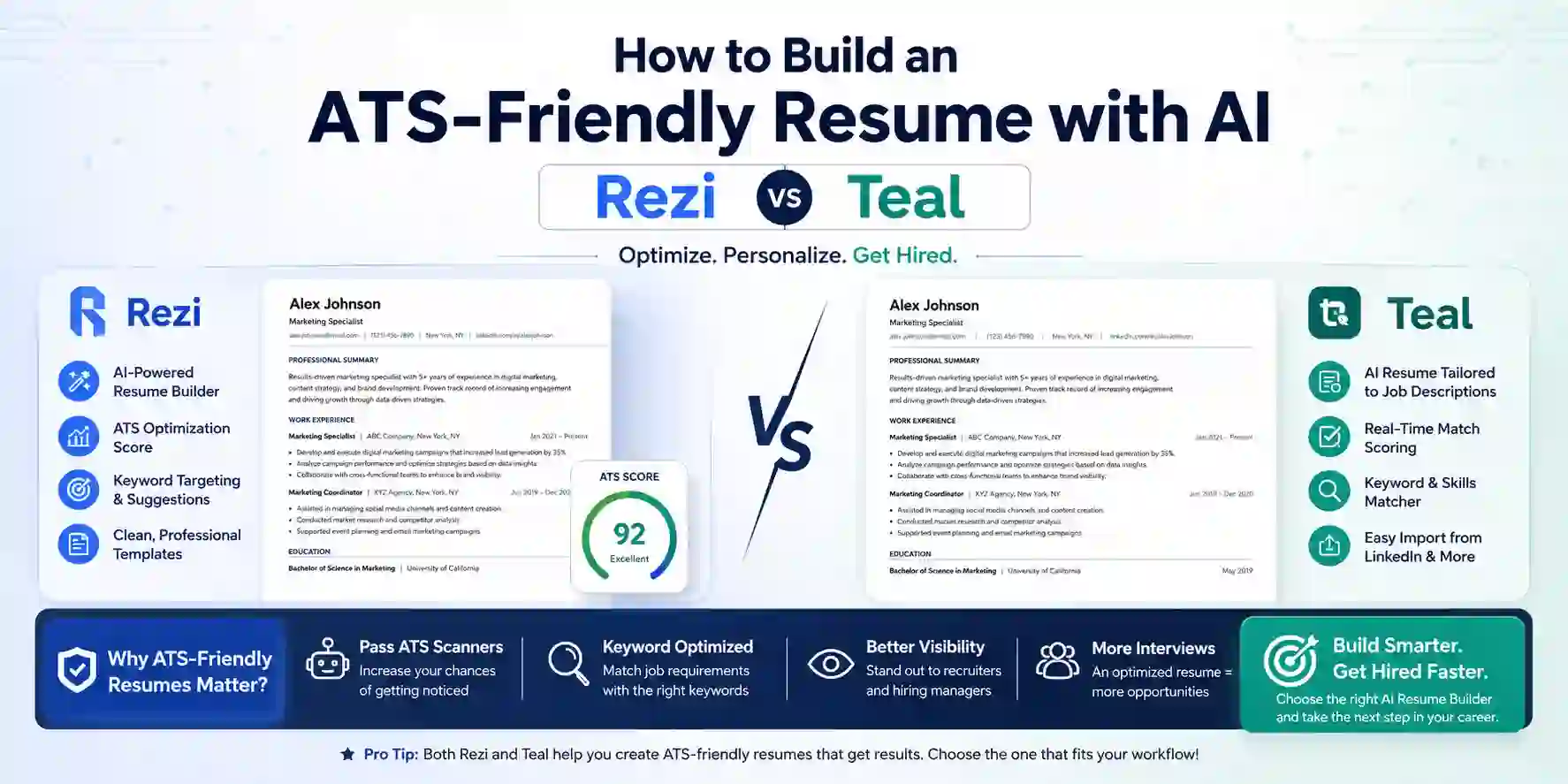
| Feature | Rezi | Teal |
|---|---|---|
| Primary strength | Real-time ATS scoring + keyword optimization | All-in-one job search workflow |
| TOP PICKReal-time ATS score | ✅ 1-100 score as you type | ⚠️ Match score, not ATS parse score |
| Job description keyword match | ✅ Gap analysis vs specific JD | ✅ Matching Mode with JD import |
| Resume templates | ATS-safe plain templates only | 11 templates, ATS-verified |
| Job tracker | ⚠️ Basic | ✅ Excellent Chrome extension + board |
| AI bullet generation | ✅ Metrics-focused prompting | ✅ AI bullet generation (paid) |
| Cover letter AI | ✅ Yes | ✅ Yes (paid) |
| LinkedIn optimization | ❌ No | ✅ Yes |
| Free tier | 1 resume, 3 downloads, no AI | Unlimited resumes + job tracker (AI limited) |
| Paid plan | $29/mo or $149 lifetime | $9/week or $29/month Pro |
| Best for | Heavy ATS roles, Big Tech, Fortune 500 | Job search management + ATS basics |
| ATS systems tested on | Workday, Greenhouse, Lever, iCIMS, Taleo | Workday, Greenhouse, Lever |
| Rating | ⭐ 4.8/5 | ⭐ 4.6/5 |
What ATS Systems Actually Do (And Why Most Resumes Fail Them)
Understanding what an Applicant Tracking System actually does changes how you approach resume writing in a fundamental way. Most job seekers, and most generic resume advice, skips this step — and it is the step that explains why strong candidates with weak resumes get silence instead of callbacks.
An ATS does three things to your resume when it arrives:
Parse: The ATS extracts structured data from your resume — name, contact information, work experience, education, skills, dates. This parsing step is where most failures happen. Multi-column layouts cause the parser to read across columns and mix text from different sections. Tables cause the parser to skip or mangle the content inside them. Text in text boxes, headers, or footers is often invisible to parsers entirely. Graphics and icons confuse the document structure. The ATS does not see a visually organized document — it sees raw text extracted sequentially, and if your layout disrupts that sequence, the data ends up jumbled or missing.
Score: After parsing, the ATS scores your resume against the job description. The score is typically based on keyword match — how many of the specific terms in the job description appear in your resume. If the job description says "React.js" and your resume says "React," the match may or may not count depending on the specific ATS. If the job description says "collaborative problem-solving" and your bullet says "worked well with the team," you get no keyword credit. The scoring is literal and unforgiving of synonym substitution.
Rank: The ATS ranks all candidates by score and surfaces the top-scoring resumes to recruiters first. A recruiter working through 400 applications for a single role may only review the top 50 resumes by ATS score. A strong candidate ranked 75th for keyword reasons never gets seen.
The 2025 Workday update that changed things: Workday's late-2025 ATS update changed parsing rules significantly. Tables, columns, icons, and decorative elements that had worked in 2024 were penalized in the new version. Most AI resume builders had not updated their templates accordingly — Rezi and Teal moved fastest to adjust. If you have a resume built on a template from a tool that has not updated since 2024, it may now fail on Workday even if it passed previously.
Rezi — Best for Real-Time ATS Scoring and Keyword Optimization
Price: Free (1 resume, 3 downloads, no AI) | Pro: $29/month | Lifetime: $149 one-time
Rezi is the tool built specifically around the ATS problem. Every design decision in the product reflects the goal of maximizing the probability that your resume gets past ATS filters and reaches a human recruiter. The templates are deliberately plain — no columns, no tables, no graphics — because plain single-column formats parse reliably across every major ATS system. The real-time 1-100 ATS score updates as you type, giving you immediate feedback on whether each addition improves or worsens your resume's machine-readability. The keyword gap analysis reads a job description you paste in and tells you exactly which terms are missing from your resume.
The real-time ATS score is Rezi's defining feature. As you write each bullet point, the score updates immediately. Add a keyword that appears in the job description and watch the score rise. Rephrase a bullet with stronger action verbs and specifics and watch the impact on your score. This gamified feedback loop — editing toward a higher score — produces resumes that are both human-readable and machine-optimized, which is the goal that most resume advice fails to address simultaneously.
The keyword gap analysis workflow: Paste a job description into Rezi's Job Description analyzer. Rezi reads the description and produces a list of keywords that appear in the JD but not in your resume, ranked by frequency. The highest-frequency missing keywords are the ones worth prioritizing — these are the terms the ATS is specifically looking for. Rezi then suggests where in your resume to naturally incorporate each keyword. This is not keyword stuffing — it is alignment between the language of your experience and the language of the role you are applying for, which is genuinely different from each other for most candidates.
The AI bullet point generator in Rezi prompts you for the specific context of each bullet — what you did, what technology you used, what the measurable outcome was — before generating anything. This approach produces bullets that contain your real specifics rather than generic filler. The output follows the standard STAR-adjacent format: action verb + what you did + technology/approach + quantified outcome. For CS students and developers who struggle to write strong bullets from their project and internship experience, this prompting approach is the most useful AI writing assistance available in any resume tool.
The $149 lifetime deal is the most significant pricing advantage in the AI resume builder market. For a student who will use the tool for placements now and career transitions every few years for the next decade, paying $149 once versus $29 monthly is clearly superior math. The tool is validated across Workday, Greenhouse, Lever, iCIMS, and Taleo — the five ATS platforms covering the majority of large company hiring.
Pros
- Real-time 1-100 ATS score updates as you type — immediate feedback on every edit's impact on machine-readability
- Keyword gap analysis identifies exactly which JD terms are missing from your resume and where to add them
- $149 lifetime plan — the best long-term value in the AI resume builder market for recurring job searches
- AI bullet generation prompts for your specific metrics and outcomes rather than generating generic filler
Cons
- Free tier is genuinely limited — 1 resume, 3 downloads, no AI features; you need paid to evaluate the core workflow
- Templates are deliberately plain and will never win a design award — appropriate for ATS, unappealing visually
- No job tracker — managing which companies you applied to requires a separate tool (Teal fills this gap)
- No LinkedIn profile optimization — Teal's LinkedIn integration adds a dimension Rezi does not address
The Rezi Resume Workflow From Scratch
- 1
Go to rezi.ai and create an account. Start with the free tier to test the interface, but note that AI features and multiple downloads require the paid plan. If you are in an active placement season, the $29/month Pro plan is worth the cost for a single month — or invest in the $149 lifetime plan if you expect to job hunt multiple times in the next five years.
- 2
Choose a template. All Rezi templates are single-column and ATS-safe by design — the choice between them is primarily font and spacing preference rather than structural difference. Do not add columns, tables, or text boxes. If you feel the urge to make the layout more visually interesting, resist — the visual interest of your resume is irrelevant until a human sees it, and the ATS comes first.
- 3
Build your experience section using the AI bullet generator. For each role or project, click 'Generate AI Content', enter the specific context: what your role was, what you built or did, which technologies you used, and any measurable outcome (performance improvement, users served, time saved, test coverage percentage). Rezi generates a bullet point from your specifics. Edit it to sound like your voice, but keep the metric.
- 4
Paste the job description for your target role into the Job Description analyzer. Review the keyword gap list Rezi produces. For the top 5-10 missing keywords, check whether they accurately describe your skills and experience. If yes, incorporate them naturally into existing bullet points or your skills section — do not create false claims. If a keyword describes something you genuinely did but did not mention, this is the right place to add it.
- 5
Check your ATS score. Aim for 75 or above for a tailored application. If your score is below 70, review the suggestions panel for the specific issues lowering your score — common problems include missing keywords, weak action verbs, dates in wrong format, and missing contact information fields.
- 6
Export in the right format. Use DOCX for applications specifying Microsoft Word format, or for older ATS systems like Taleo where DOCX parses more reliably. Use PDF for modern ATS systems (Workday, Greenhouse, Lever) and when format is not specified. Never export with password protection — it prevents ATS parsing entirely.
Teal — Best All-in-One Job Search System
Price: Free (unlimited resumes + job tracker, limited AI) | Pro: $9/week or $29/month
Teal is not primarily a resume builder — it is a job search management platform that includes a strong resume builder. The distinction matters because Teal's most valuable features are not about resume content but about managing the job search process: tracking every application, saving job listings with one click from any company's careers page via the Chrome extension, and maintaining a dashboard that shows where you are in each pipeline.
The Chrome extension is Teal's most distinctive feature. Install the extension and visit any job listing — on LinkedIn, Indeed, Naukri, a company's careers page, or anywhere else. Click the Teal icon and the job is saved to your Teal job tracker with the title, company, and job description automatically captured. You never lose a job listing you wanted to apply for, never have to re-open a tab to copy the job description, and never lose track of whether you applied, heard back, or were rejected. For students applying to dozens of companies during a placement season, this tracking layer is the difference between a managed search and an anxious chaos.
The resume builder itself is strong — 11 ATS-verified templates, all single-column and parse-safe, with a keyword Matching Mode that imports a saved job description and highlights which keywords from the JD are present or missing in your resume. The free tier allows unlimited resumes with basic features — you can create a different tailored version of your resume for each job category without a limit, which is genuinely more useful than Rezi's 1-resume free tier.
The AI bullet generator in Teal Pro asks for your specific experience context (role, responsibilities, technologies, outcomes) and generates achievement-focused bullets — similar in approach to Rezi's generator. The quality of the generated content is comparable between the two tools when you provide specific inputs. The differentiator is the surrounding workflow: Teal's AI suggestions are displayed alongside the specific job you saved from your tracker, making the tailoring loop between resume and job description more integrated.
The LinkedIn optimization feature is available in Teal's Pro plan and reviews your LinkedIn profile against job descriptions, suggesting keyword improvements in your headline, summary, and experience sections. For students who use LinkedIn as a primary recruiting channel, this extension of Teal's optimization from resume to LinkedIn profile adds meaningful value.
The honest limitation of Teal: The ATS scoring in Teal is a keyword match score, not an ATS parse score. It tells you how well your resume keywords align with a job description, but it does not simulate how an actual ATS system would parse and score your document. Rezi's 1-100 score is a more direct simulation of ATS behavior. For roles at companies with strict ATS filtering, Rezi's scoring is the more reliable signal.
Pros
- Chrome extension saves any job listing to the tracker in one click — the best job application management in any tool
- Unlimited resumes on the free tier — create tailored versions for every application category without hitting a limit
- LinkedIn profile optimization included in Pro — extends resume keyword alignment to your LinkedIn presence
- Matching Mode clearly shows which JD keywords are present or missing in a visual, actionable interface
Cons
- ATS score is keyword-match only, not a parse simulation — less reliable than Rezi's 1-100 score for strict ATS roles
- $9/week Pro pricing is awkward — monthly commitment is more predictable; annual plan at $29/month is significantly better value
- AI bullet generation and cover letter tools are locked behind Pro — free tier resume building is template-only
- Less template variety than some competitors — 11 templates, all deliberately plain; no design-forward options
Head-to-Head: When to Use Rezi vs Teal
You Are Applying to Big Tech, MNCs, and Fortune 500 Companies
Use Rezi. These companies use enterprise ATS systems (Workday, Greenhouse, iCIMS) with strict parsing rules and multi-layer keyword scoring. Rezi's templates are tested against these specific systems, and the real-time ATS score gives you a direct measure of how your resume will perform in their pipeline. The keyword gap analysis tailored to each job description is the specific workflow that improves ATS scores on competitive applications.
You Are Managing 20+ Applications Simultaneously During Placement Season
Use Teal. The Chrome extension and job tracker are what make Teal uniquely valuable for high-volume application management. When you are applying to thirty companies over three weeks, tracking which roles you have applied for, which are pending, and which have responded becomes a real organizational challenge. Teal's tracker solves this problem in a way Rezi does not attempt.
You Are a First-Time Resume Builder Starting From Scratch
Use Teal's free tier. The unlimited resume creation, clear template selection, and Matching Mode keyword feedback give first-time resume builders a structured starting point without paying anything. Build your base resume in Teal, then run it through Rezi's ATS score (free tier allows one score) before submitting to each major application.
You Are Tailoring the Same Base Resume to Multiple Specific Roles
Use Rezi for scoring, Teal for tracking. The ideal workflow for a targeted job search: build your base resume in either tool, use Teal's tracker to save and organize each job listing, use Rezi's keyword gap analysis to create a tailored version for each major role category, and use Rezi's ATS score to verify each tailored version before submitting.
You Are a CS Student or Developer Applying for Technical Internships in India
Start with Teal's free tier. Teal's unlimited resume creation handles the iterative resume development that students typically go through — multiple drafts, multiple versions for different company types, feedback from seniors. When you are ready to apply to your priority companies (the ones where you most want to pass the ATS filter), pay for one month of Rezi Pro to score and optimize those specific applications. This combination spends the least money while giving you both tools' core capabilities where they matter most.
The AI Prompt Framework for Resume Bullet Points
The most important skill in AI-assisted resume writing is knowing how to prompt for specific, strong bullet points rather than generic ones. Whether you are using Rezi's bullet generator, Teal's AI tools, Claude, or ChatGPT, the input quality determines the output quality.
The Weak Prompt (produces generic output): "Write a resume bullet point for a software engineering intern."
Output: "Developed software solutions using various programming languages to meet business requirements." — This is the kind of AI-generic phrasing that experienced recruiters recognize immediately and that ATS systems score poorly for specificity.
The Strong Prompt (produces specific output):
Write a resume bullet point for this experience:
- Role: Backend Engineering Intern
- Company: EdTech startup
- What I built: REST API for a quiz generation feature
- Technologies: Node.js, Express, PostgreSQL
- Measurable outcome: The API reduced quiz generation time from 8 seconds to 1.2 seconds,
  which reduced user drop-off on the quiz start screen
- Team context: I owned the feature end-to-end including the database schema design

Format: Start with a strong action verb. Include the technology. Include the metric.
Keep it under 25 words.
Output: "Engineered a Node.js REST API for quiz generation, reducing response time from 8s to 1.2s and improving quiz completion rates."
The difference is not the AI — it is the specificity of what you give the AI to work with. Your real metrics, your real technologies, your real scope are what separate a resume that sounds like every other AI-generated resume from one that sounds like your specific experience.
The metric question to ask yourself before writing any bullet: For every project, internship, or role: "What got faster, bigger, better, or cheaper because of what I did?" The answer is your metric. If you cannot find a metric, ask: "How many users? How many requests? What was the test coverage before and after? How much did the error rate drop? How many hours did this save?"
Use this framework whether you are prompting Rezi's built-in generator, Claude, or ChatGPT. The AI tools covered throughout this blog series — from best AI coding tools to Cursor and Copilot — generate better outputs with specific, constrained prompts, and resume bullets are no different.
Using Claude and ChatGPT Alongside Rezi and Teal
Dedicated resume tools handle ATS scoring and job tracking. General-purpose AI tools — Claude, ChatGPT — handle the content quality layer with more flexibility and depth than any dedicated resume builder's built-in AI. The two categories are complementary, not competing.
Where Claude outperforms Rezi's AI:
Tailoring your professional summary. Paste the job description, your current summary, and ask Claude: "Rewrite this professional summary to align with this job description. Mirror the vocabulary and priorities of the JD without copying phrases directly. Keep it under 60 words. Make it sound like a senior developer with my specific background, not a generic candidate."
Identifying transferable language. Paste your bullet points and a job description and ask: "Which of my bullet points are most relevant for this specific role? For the top three, suggest a minor rewrite that better reflects the language and priorities of this job description without changing the facts."
Generating the cover letter. Paste the job description, your resume, and what you know about the company and ask Claude to write a specific, non-generic cover letter. Claude's cover letters, when prompted with sufficient context, are meaningfully better than the templated outputs from most dedicated resume tools.
Where Rezi outperforms Claude:
ATS score. Claude cannot tell you whether your resume will pass Workday's parser. It has no access to ATS systems and cannot simulate parse accuracy. For ATS validation, Rezi's score is irreplaceable.
Template compliance. Claude does not enforce ATS-safe formatting. It can write excellent content that you then paste into a layout with columns and tables, which defeats the ATS optimization entirely. Rezi's templates ensure structural compliance by default.
The practical workflow: write content and tailoring in Claude, paste into Rezi's template, check the ATS score, adjust keywords based on the gap analysis, export. Two tools doing distinct jobs better than either would alone — the same principle from our AI tools for literature review guide where different tools serve different phases of the same workflow.
The ATS-Safe Formatting Rules Every CS Student Needs to Know
These rules are not stylistic preferences — they are technical requirements determined by how ATS parsers actually extract text from documents. Violating them reduces parse accuracy regardless of which tool you use.
Rule 1: Single column only. Multi-column layouts cause parsers to read across columns, mixing text from different sections. Your skills from the left column and your job title from the right column get combined into garbled text. Single column, reading top to bottom, is what every major ATS expects.
Rule 2: No tables. Tables are the most common ATS failure point. Content inside table cells is either skipped or extracted out of context. The skills section, the experience section, and any other structured content should be plain text with section headers, not table rows.
Rule 3: Standard section headers. ATS systems recognize "Work Experience," "Education," "Skills," "Projects," and "Certifications." Clever alternatives — "Where I've Made an Impact," "My Journey," "Tools I Use" — may not be recognized as standard sections and their content may be filed incorrectly.
Rule 4: No text boxes, headers, or footers. Text in floating text boxes, document headers, and document footers is often invisible to ATS parsers. Contact information placed in the document header — a common design choice — may not be extracted by the ATS, meaning your phone number and email are missing from the parsed record.
Rule 5: No graphics, icons, or logos. Icons next to section headers, company logos, skill rating bars, and profile photos are all invisible to ATS parsers and create visual noise around the text that some parsers misread. Remove all decorative elements.
Rule 6: Standard fonts. Calibri, Arial, Garamond, Georgia, Times New Roman, and similar standard fonts are safe. Decorative or unusual fonts may render as symbols or be substituted with incorrect characters during parsing.
Rule 7: Dates in consistent, standard format. Month Year (May 2024, not 05/24 or May '24) is the most reliably parsed date format across ATS systems. Consistent formatting across all dates reduces parsing errors on date extraction.
The Keyword Strategy That Actually Works
Keyword optimization is the most misunderstood aspect of ATS optimization — both over-applied (keyword stuffing that reads as spam) and under-applied (ignoring the fact that specific phrasing matters).
The right approach: mirror the JD's exact phrasing where accurate.
If the job description says "containerization with Docker and Kubernetes," do not write "experience with container technology." Write "Docker and Kubernetes" — the exact terms. ATS systems often score on exact match for technical keywords, and "container technology" without the specific tool names may score zero despite being accurate.
If the job description says "cross-functional collaboration," and you have done this, include those exact words in a bullet — not as a generic claim, but embedded in a specific statement: "Collaborated cross-functionally with product and design teams to define the API contract for three new features."
The keyword categories that matter for CS roles:
Programming languages: List them explicitly in your skills section using the exact names from the JD. Python, not Python 3.x; JavaScript, not JS; TypeScript, not TS (unless the JD abbreviates it).
Frameworks and libraries: React.js vs React vs ReactJS — check the JD's specific capitalization and spelling. ATS systems vary in how they handle variants.
Tools and platforms: AWS vs Amazon Web Services, GCP vs Google Cloud Platform — include both variants in your skills section if space allows, since JDs use both and ATS behavior varies.
Methodologies: Agile, Scrum, REST API, CI/CD, DevOps — if these appear in the JD and you have experience with them, they belong in your resume using the exact terms.
What to avoid: Keyword stuffing (listing 40 skills in a wall of text), using keywords that do not reflect real experience (ATS passes but human interview fails), and placing keywords only in the skills section without embedding them in context in your bullet points (some ATS systems weight contextual usage more than section listings).
The Practical Resume Stack for Indian CS Students in 2026
Based on the tools available, their honest limitations, and the specific context of Indian campus placements and early-career job searching, here is the practical recommended stack:
Step 1 — Build your base resume in Teal (free): Create a clean, single-column resume using Teal's free tier. Use their templates — all ATS-safe. Build your experience bullets with specific metrics using the prompt framework above. This is your master resume.
Step 2 — Track every application in Teal (free): Install the Teal Chrome extension. Save every job listing you consider applying for to your Teal tracker. When you apply, mark it. This prevents the chaos of losing track of what you applied for and when.
Step 3 — Score and optimize priority applications in Rezi (paid, limited): For your top 10-15 priority applications — the companies where getting past ATS matters most — paste the job description into Rezi's analyzer, check your keyword gaps, update your tailored version, and verify the ATS score. If you are in an active placement season, one month of Rezi Pro at $29 gives you unlimited scoring for the duration of the season. If you plan to job hunt repeatedly over several years, the $149 lifetime plan pays for itself after six months.
Step 4 — Use Claude for content quality (free): For professional summary tailoring, cover letter generation, and bullet point improvement beyond what the dedicated tools produce, use Claude with the specific prompt framework above. Claude's output with good inputs is better than most dedicated resume AI tools for prose quality.
Step 5 — Verify final formatting manually: Before submitting any resume, paste the plain text of your exported PDF into a plain text editor (Windows Notepad, macOS TextEdit in plain text mode). If the text reads logically — contact info at the top, sections in order, bullets readable — the ATS will likely parse it correctly. If text from different sections is jumbled together or certain content is missing, you have a formatting problem to fix.
What to Avoid: The Resume Mistakes That Cost Callbacks
Using a Canva or Notion-designed resume for ATS-filtered roles. Canva resumes are beautiful and ATS-hostile. Multi-column layouts, decorative elements, and non-standard fonts create parsing failures on virtually every major ATS. For design-sensitive roles (UX, product design, marketing) where a human creative professional screens first, a Canva resume may be appropriate. For engineering and technical roles at companies with ATS filtering, it is counterproductive.
Treating the ATS score as the finish line. A 90+ ATS score means the software will likely surface your resume to a recruiter. It does not mean the recruiter will find it compelling. The ATS score is a filter, not a success metric. After optimizing for ATS, optimize for human appeal — clear narrative, strong metrics, readable structure, and a professional summary that tells a story about why you are the right candidate for this specific role.
Submitting the same resume to every application. The keyword gap between a "Software Engineer, Backend" JD and a "Full Stack Developer" JD is real and significant. Tailoring your resume to each major application category — not every individual application, but each distinct role type — meaningfully improves ATS scores. Teal makes managing multiple versions practical; Rezi makes verifying each version's ATS score efficient.
Using AI-generic language. "Spearheaded cross-functional initiatives," "leveraged synergies," "drove transformational outcomes" — these phrases are now recognizable as AI filler to experienced recruiters. They also score poorly for specificity in ATS systems that reward measurable content. Every phrase in your resume should be specific to your actual experience.
The Resume Strategy That Gets CS Students Past ATS in 2026
The winning approach is not one tool — it is a three-layer workflow. Use Teal's free tier for unlimited resume versions and application tracking throughout your entire placement season. Use Rezi (one month of Pro at $29, or $149 lifetime) to score and optimize your resume specifically for your top priority applications — the ones where passing the ATS matters most. Use Claude (free) for content quality — professional summary tailoring, cover letter generation, and bullet point refinement that reads like your real voice rather than AI filler. Each tool covers the gap the others leave: Teal for management, Rezi for ATS validation, Claude for content quality. The combination costs under ₹2,500 for a full placement season and produces results that any single tool alone cannot match.
Final Thoughts
The ATS problem is not about gaming a system — it is about removing an unnecessary barrier between your real qualifications and the humans who would recognize them. A two-column resume with a beautiful Canva layout is not a bad resume because it looks unprofessional — it is a bad resume for ATS-filtered applications because the software cannot read it. Fixing that is not compromise; it is pragmatism.
The good news is that fixing the ATS problem does not require compromising on content quality. A single-column, ATS-safe resume with strong, metric-driven bullets written in your real voice is both machine-readable and human-compelling. The tools in this guide — Rezi for scoring, Teal for tracking, Claude for content — make building that resume systematically achievable rather than a skill that requires knowing someone who knows how resumes work.
Start with your base resume in Teal today. Add metrics to every bullet using the framework in this article. Run it through Rezi's keyword gap analysis for each major application. Use Claude to polish the summary and cover letter. Export as a single-column PDF. Submit.
The resume that reaches a human is the one that gets you the callback. Everything before that — the ATS score, the keywords, the formatting — is just making sure the first step happens.